YouTube Competitive Intelligence with Claude AI: How OutlierKit Powers AI-Assisted Research
OutlierKit is built around niche-wide competitive intelligence rather than single-channel stats. It covers audience psychographics, sponsor mapping, monetization analysis, and outlier detection across thousands of channels, and it hands all of it to Claude as structured data.
A transcript tells Claude what one video said. OutlierKit tells it how that video performed against its channel and its niche. The same data powers our trending niches report, which pulled 677 live videos through the OutlierKit API to measure how often each niche produces 10x outliers. You can connect it to Claude three ways: a no-setup export, the MCP connector, or the API.

Watch the MCP setup and a live competitive analysis run in Claude before you work through the methods below.
Who this is for
- ✓YouTube agency teams managing multiple client channels
- ✓Businesses using YouTube for lead generation
- ✓Experts, consultants and coaches who already use Claude to plan their channel
In This Guide
Setting this up for an agency, team, or product?
Book a 30-minute demo with the founder. We'll walk through Claude + OutlierKit live and cover API/MCP access and multi-seat pricing.
What does OutlierKit give Claude that transcripts cannot?
Every YouTube transcript tool gives Claude the same thing: what was said in a video. That includes MCP servers, Chrome extensions, and copy-paste. OutlierKit adds the context around that video: the niche it competes in and why it outperformed.
When you feed OutlierKit's Competitor Studio data into Claude, the AI can work with:
Audience Psychographic Profiles
Specific viewer segments, like "hustleface founders" or "corporate escapers." Each segment lists its psychological drivers, motivations, and pain points.
Niche-Wide Outlier Analysis
1,000 to 5,000+ outlier videos across an entire niche. Each one carries channel attribution, relevance scoring, and recency data.
Sponsor Intelligence
Which brands sponsor content in a niche. See emerging vs. established sponsors and category dominance patterns.
Monetization Mapping
How channels actually generate revenue. You get percentage breakdowns of lead magnets, newsletters, services, and product sales.
Comment Intelligence
Audience requests, pain points, and praise signals extracted from comments across an entire niche.
Competitor Benchmarking
Performance metrics compared against the niche median, beyond the channel's own history.
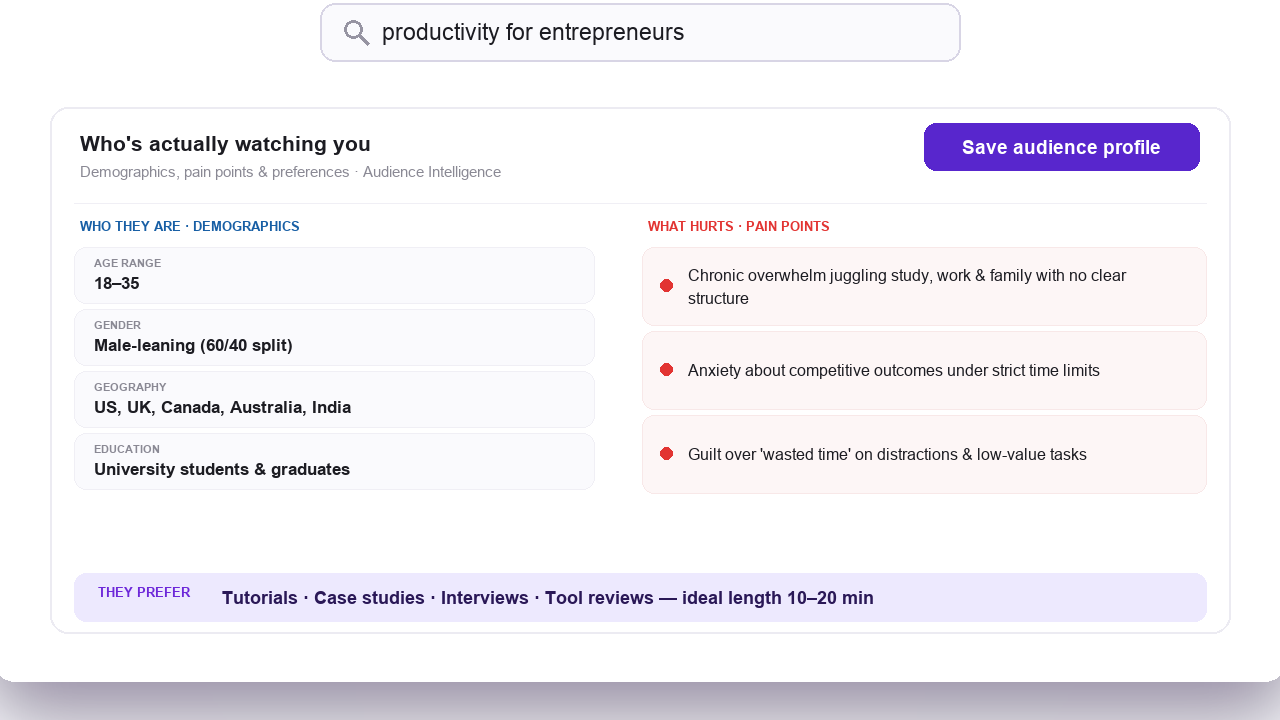
Audience psychographic profiles in Competitor Studio
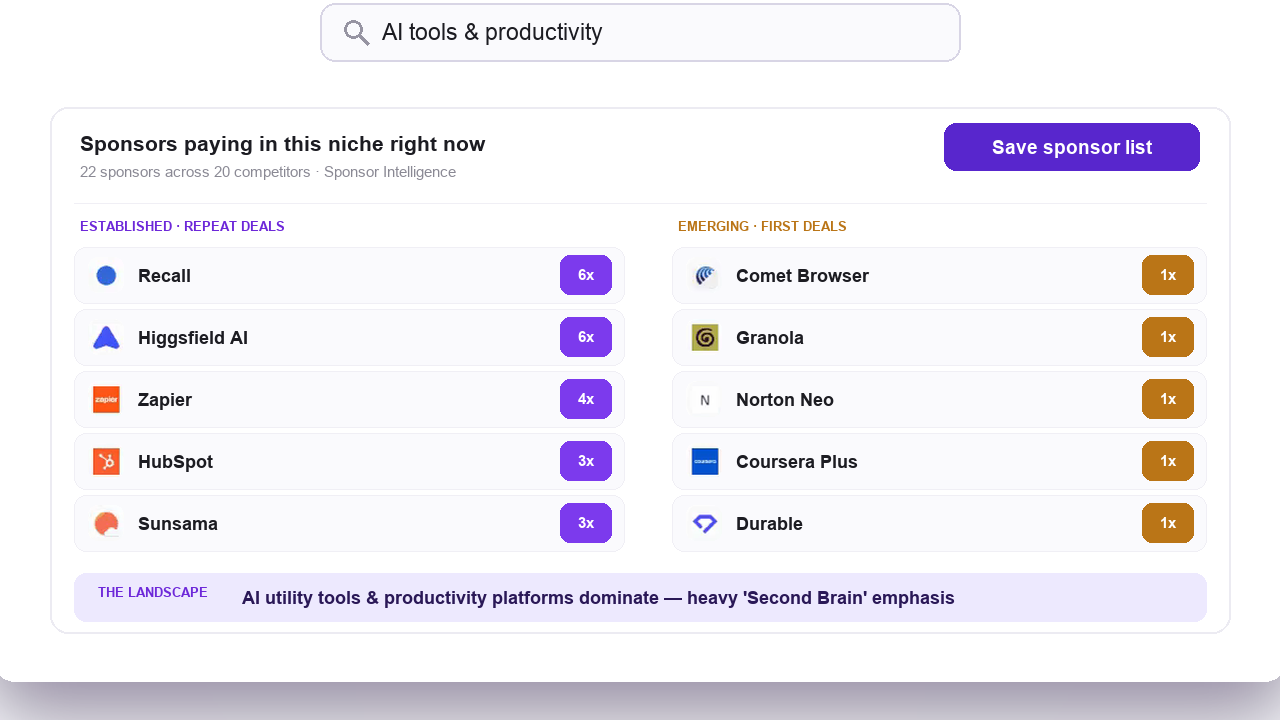
Sponsor intelligence mapping across a niche
This is the difference between asking Claude “summarize what this creator said” and asking Claude “analyze the competitive dynamics of this entire niche and tell me where the opportunities are.”
Method 1: Export OutlierKit Data into Claude (Works Today, No Setup Required)
This is the fastest way to combine OutlierKit's competitive intelligence with Claude's analytical capabilities. No API key, no MCP configuration, no technical setup.
Step 1: Run Your Analysis in OutlierKit
Use Competitor Studio, Outlier Research, Keyword Research, or Deep Research to generate a report.
Step 2: Export or Copy the Report Data
Copy audience psychographics, outlier videos, sponsor intelligence, and monetization mapping from your dashboard.
Step 3: Use Claude with Targeted Prompts
Paste OutlierKit data into Claude with one of the prompt templates below for strategic analysis.
OutlierKit features that generate Claude-ready data:
Full niche intelligence: audience psychographics, outlier videos, sponsor landscape, monetization strategies.
Videos performing 5-10x above channel average across a niche.
Low-competition, high-demand keywords with RPM data.
Personalized content recommendations based on channel and niche data.
The app also has packaging and script tools, on every plan and the free trial. Before you record, it writes 16 titles ranked against real breakout videos near your topic, writes the description and picks hashtags, writes chapter titles, and reviews the script you wrote.

Competitor Studio niche analysis in action
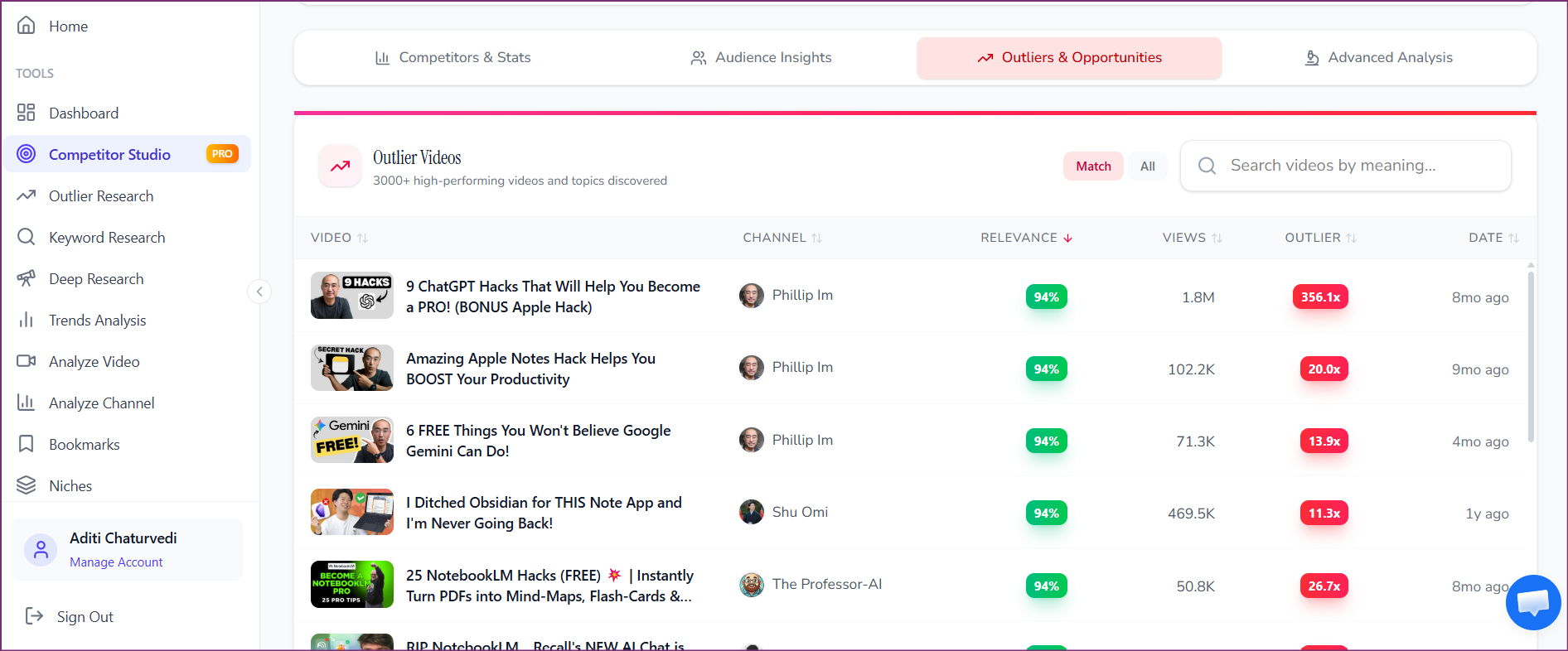
Thousands of outlier videos identified across a niche
Best modules to copy into Claude from Competitor Studio:
- 1.Audience Psychographics: copy the full segment profiles
- 2.Outliers & Opportunities: copy the top 20-50 outlier videos with their metrics
- 3.Sponsor Intelligence: copy the sponsor landscape summary
- 4.Funnels & Monetization: copy the monetization breakdown
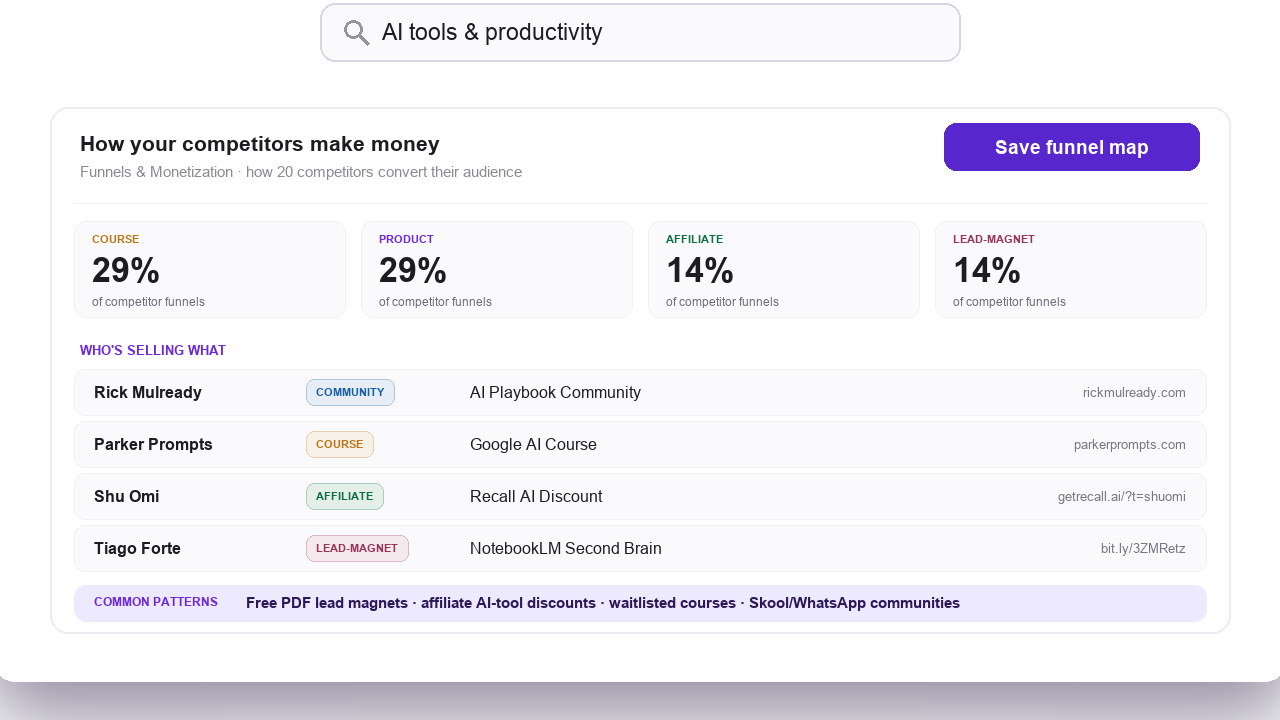
Monetization and funnel analysis data
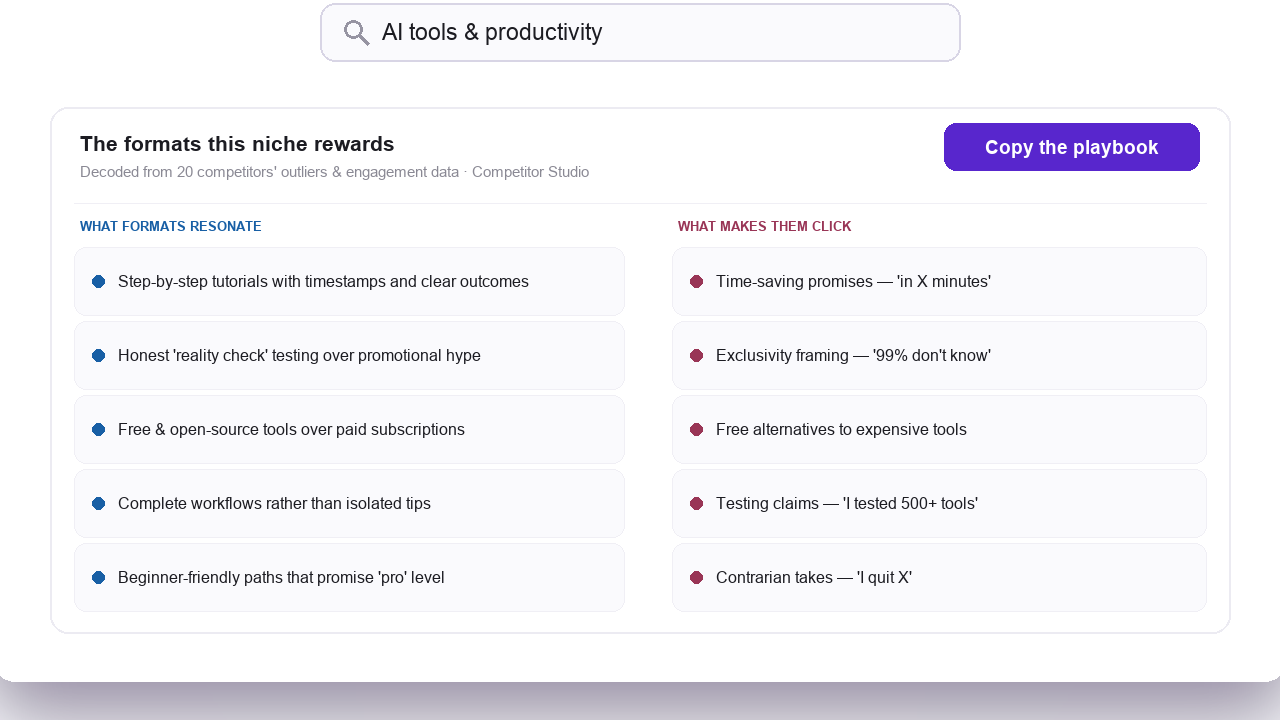
Comment intelligence: what makes audiences click
Want these prompts wired into a real workflow?
Book a 30-minute demo with the founder. We'll set up Claude + OutlierKit against your channels live and cover API/MCP access and team pricing.
Which prompts work for YouTube research with Claude and OutlierKit?
Each template runs against a specific OutlierKit export. Click Copy prompt on any template, paste it into Claude, then replace the bracketed sections with your actual data.
Niche Validation
Evaluate whether to enter a niche on YouTube
OutlierKit data needed:
I'm evaluating whether to enter [NICHE NAME] on YouTube. Here is the Competitor Studio report from OutlierKit for a seed channel in this niche:

[PASTE COMPETITOR STUDIO SUMMARY: niche mapping section].

[PASTE AUDIENCE PSYCHOGRAPHICS: all segments].

[PASTE OUTLIER VIDEOS: top 30 by outlier score].

Based on this competitive intelligence:
1. Is this niche viable for a new channel? What's the realistic subscriber trajectory?
2. Which audience segment is most underserved based on the psychographic profiles?
3. What content formats dominate the outlier videos, and where are the format gaps?
4. What's the minimum production quality bar based on what's already working?
5. Give me a specific 12-video launch sequence targeting the underserved segment you identified.
Content Gap Analysis
Find topics and formats the audience wants but no one is making
OutlierKit data needed:
Here is OutlierKit's Competitor Studio data for my niche [NICHE NAME]:

[PASTE OUTLIER VIDEOS: top 50].

[PASTE AUDIENCE PSYCHOGRAPHICS: all segments].

[PASTE COMMENT INTELLIGENCE: audience requests and pain points].

Analyze the outlier videos against the audience psychographic segments and comment signals. Identify:
1. Topics the audience is explicitly requesting (from comments) that no outlier video has addressed.
2. Audience segments with strong psychographic drivers but few videos targeting them specifically.
3. Video formats that work for one segment but haven't been tried for another.
4. Three content ideas that combine an unmet audience need with a proven format from the outlier data.
Competitive Positioning
Understand where you stand and how to close the gap on top competitors
OutlierKit data needed:
I run a YouTube channel in [NICHE NAME]. Here is my competitive intelligence from OutlierKit:

[PASTE COMPETITOR DISCOVERY: fastest growing, most views, emerging channels].

[PASTE BENCHMARKING: my channel vs. niche median].

[PASTE AUDIENCE PSYCHOGRAPHICS].

Compare my channel's position against the other channels in this data. Specifically:
1. Which competitors are growing fastest and what content strategy drives their growth?
2. Where does my channel outperform the niche median, and where do I underperform?
3. Which audience segment should I double down on based on where competitors are weakest?
4. What would a 90-day strategic plan look like to close the gap on the top 3 competitors?
Sponsor Strategy
Understand the sponsorship landscape and attract high-value sponsors
OutlierKit data needed:
I want to understand the sponsorship landscape in [NICHE NAME]. Here is OutlierKit's Sponsor Intelligence report:

[PASTE SPONSOR INTELLIGENCE: established sponsors, emerging sponsors, category dominance].

[PASTE MONETIZATION MAPPING: how channels in the niche make money].

[PASTE AUDIENCE PSYCHOGRAPHICS].

Analyze this sponsor data and tell me:
1. Which sponsor categories pay the most and how do I position my content to attract them?
2. Are there emerging sponsors that smaller channels could land before they become saturated?
3. Based on the audience psychographics, which sponsor verticals would resonate best with my viewers?
4. What content topics or formats tend to attract the highest-value sponsors in this niche?
5. Draft a sponsor outreach email I could send to [SPECIFIC SPONSOR CATEGORY] based on this data.
Weekly Content Calendar
Build a data-driven content calendar from this week's competitive intel
OutlierKit data needed:
Here is this week's competitive intelligence from OutlierKit:

[PASTE TOP 10 OUTLIER VIDEOS FROM THE LAST 7 DAYS].

[PASTE KEYWORD RESEARCH: top 20 low-competition keywords].

[PASTE AUDIENCE PSYCHOGRAPHICS: primary segment].

Build me a 5-video content calendar for the next two weeks. For each video:
1. Title (optimized for the keyword data provided).
2. Target audience segment (from the psychographic profiles).
3. Which outlier video inspired the angle (and how to differentiate).
4. Thumbnail concept.
5. First 15 seconds hook approach.
6. Estimated production time.
Agency Client Reporting
Generate professional client-facing competitive intelligence briefs
OutlierKit data needed:
I manage YouTube strategy for a client in [NICHE NAME]. Here is the latest OutlierKit Competitor Studio report:

[PASTE FULL COMPETITOR STUDIO REPORT].

Write a client-facing competitive intelligence brief that covers:
1. Executive summary: 3 sentences on the niche's competitive state.
2. Key opportunities: the 3 biggest content gaps based on outlier and audience data.
3. Threats: emerging competitors and what they're doing differently.
4. Recommendations: 5 specific actions for the next 30 days, ranked by expected impact.
5. Metrics to track: which KPIs should the client watch based on these findings.

Format this as a professional document I can send to the client. Use clear headers and data points, not marketing language.
Start analyzing competitors with Claude
Get the competitive intelligence data Claude needs. Try OutlierKit free.
Method 2: The OutlierKit MCP Connector in Claude (Live)
This is the fastest method now that the connector is live. It is a remote MCP server, so there is nothing to install. Open claude.ai, go to Settings then Connectors, click Add custom connector, paste https://outlierkit.com/mcp, and sign in with Google. In Claude Code it is one command: claude mcp add outlierkit --transport http https://outlierkit.com/mcp. After that you can ask Claude things like:
- “Search OutlierKit for outlier videos in personal finance and tell me what the titles have in common”
- “Find the channels most similar to this one, matched on size, and show each one's top outlier”
- “Pull this video's transcript and comments, then tell me what viewers wanted more of”
Ten read-only tools come with it. Each call costs 2 to 10 credits depending on the tool, from the same balance the app uses.
| MCP Tool | What It Does | Credit Cost |
|---|---|---|
| outliers_search | Semantic search across our indexed outlier videos | 2 credits |
| outliers_refresh | Fetches newer outliers live from YouTube and scores them | 10 credits |
| channels_search | Semantic search across our indexed outlier channels | 5 credits |
| channels_similar | Finds channels most similar to a seed channel | 5 credits |
| channels_get | Fetches one channel by id | 5 credits |
| channels_videos | Recent uploads from a channel, always live | 5 credits |
| videos_get | Fetches one video by id, with its outlier score | 2 credits |
| videos_transcript | Fetches a video transcript, cached after the first pull | 2 credits |
| videos_comments | Comments for a video, always live | 2 credits |
| keywords_research | Expands seed keywords into related searches with volumes | 2 credits |
Requirements: Pro or higher, or the 3-day free trial, and a Google account tied to your OutlierKit login. Works in Claude, in Claude Code, and in any client that supports remote MCP servers over HTTP.
Worth knowing: the connector covers the research primitives. Competitor Studio, with its audience psychographics and sponsor mapping, still runs in the app.
Full MCP setup guide →Method 3: OutlierKit API via Claude Tool Use (Live)
For agencies and developers building custom Claude-based tools, OutlierKit's API can be configured as a Claude tool. This enables you to build:
Automated Client Onboarding
A Claude-powered agent that takes a client's channel URL, runs Competitor Studio analysis, and generates a strategy document.
Weekly Intelligence Briefings
Scheduled Claude agents that pull fresh OutlierKit data and produce reports for your team.
Interactive Research Assistants
Claude-based chatbots that let your team query YouTube competitive data conversationally.
Requirements: OutlierKit Pro or Max Plan (API access included), Claude API key, development resources. OutlierKit API calls cost 2 to 10 credits depending on the endpoint, bearer-token auth, JSON in / JSON out.
How does this compare with transcript analysis in Claude?
| Capability | Transcript Analysis | OutlierKit + Claude |
|---|---|---|
| Summarize video content | ✓ | ✓ |
| Analyze what a creator said | ✓ | ✓ |
| Map an entire niche's competitor set | ✕ | ✓ |
| Identify audience psychographic segments | ✕ | ✓ |
| Find outlier videos across thousands of channels | ✕ | ✓ |
| Map sponsor landscape and monetization strategies | ✕ | ✓ |
| Detect content gaps from niche-wide comment analysis | ✕ | ✓ |
| Generate data-backed content strategy | ✕ | ✓ |
They're complementary. Use a YouTube transcript MCP server to analyze what top-performing videos say. Use OutlierKit to understand why those videos outperform and what strategic opportunity they reveal.
Which OutlierKit Plan Works Best with Claude?
For the export-to-Claude workflow (Method 1), any OutlierKit plan works:
Hobby Plan
$49/month
100 credits/month
Individual creators running occasional competitive analyses
Enough for 50 keyword or outlier searches at 2 credits each, or a mix with channel analyses at 10 credits. Competitor Studio needs Pro or Max.
Pro Plan
$99/month
$49.92/month billed annually
500 credits/month
Consistent weekly research cycles
Enough for ~8-10 Competitor Studio reports plus ongoing keyword and outlier monitoring. API and MCP access included.
API accessMax Plan
$399/month
$166.58/month billed annually
2,000 credits/month
Agencies and teams managing multiple channels
API and MCP access included. Enough for 30+ Competitor Studio reports per month across client accounts.
API access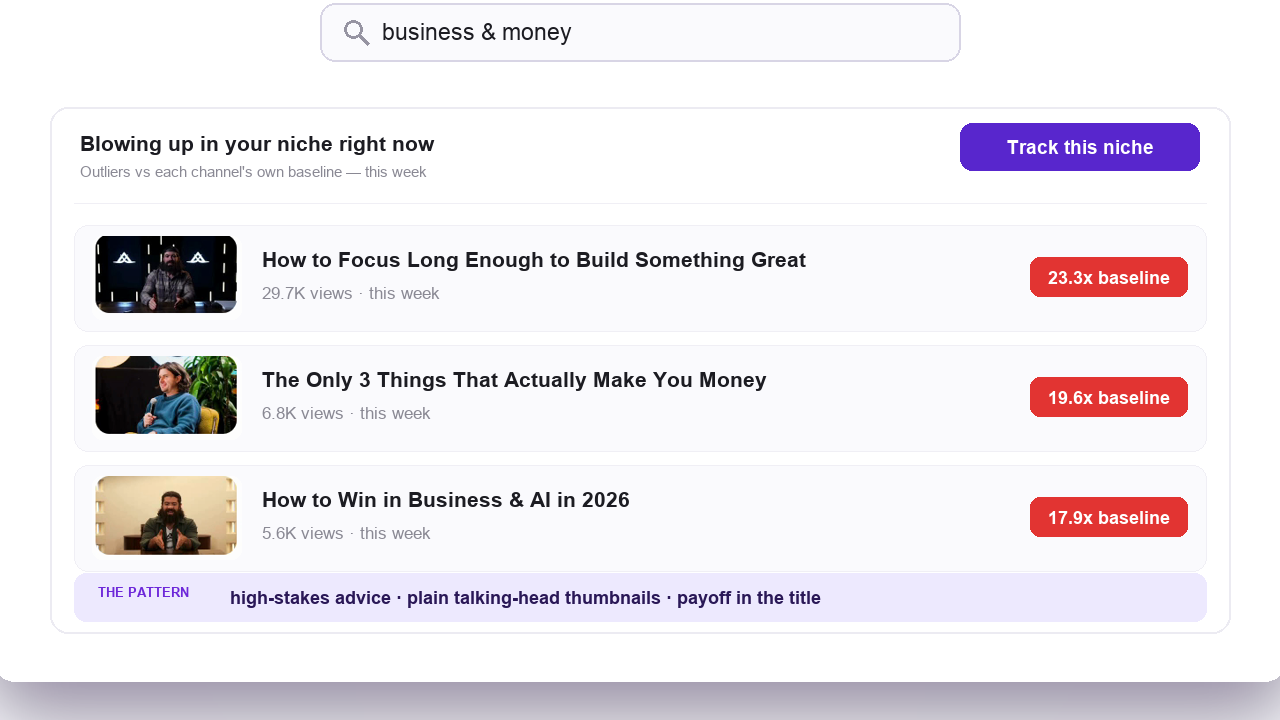
Outlier video research
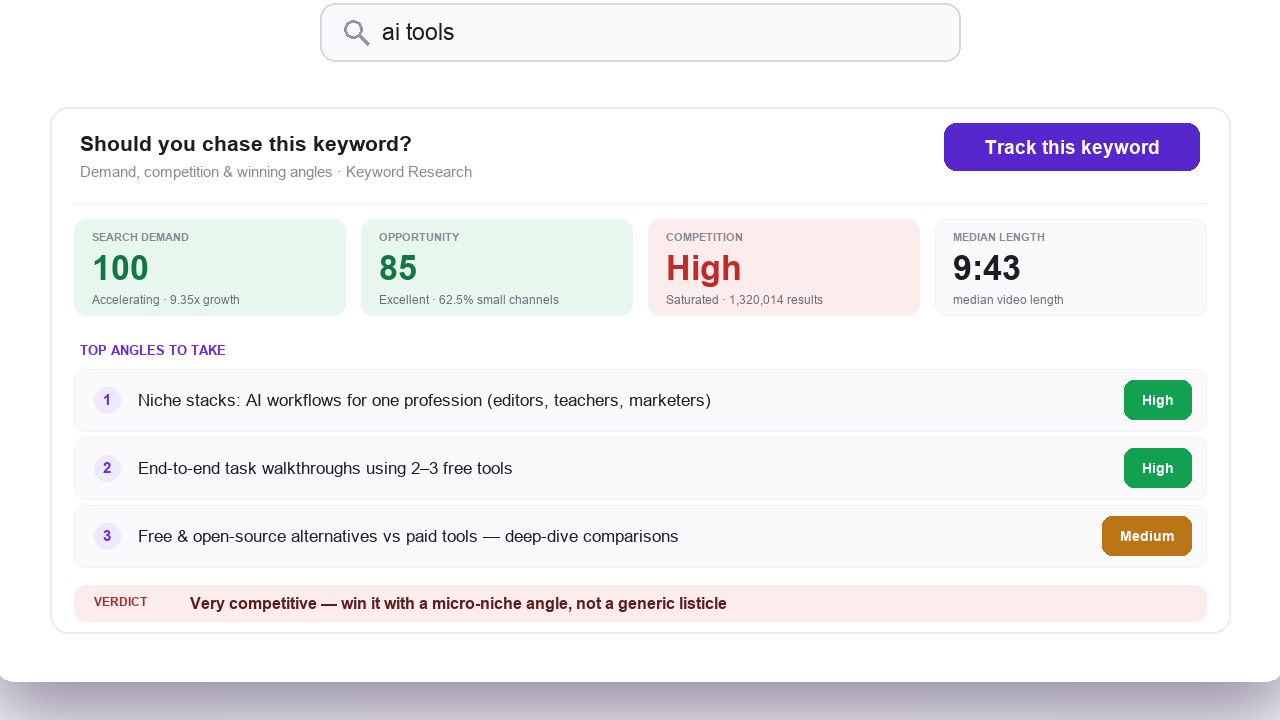
Keyword research tool
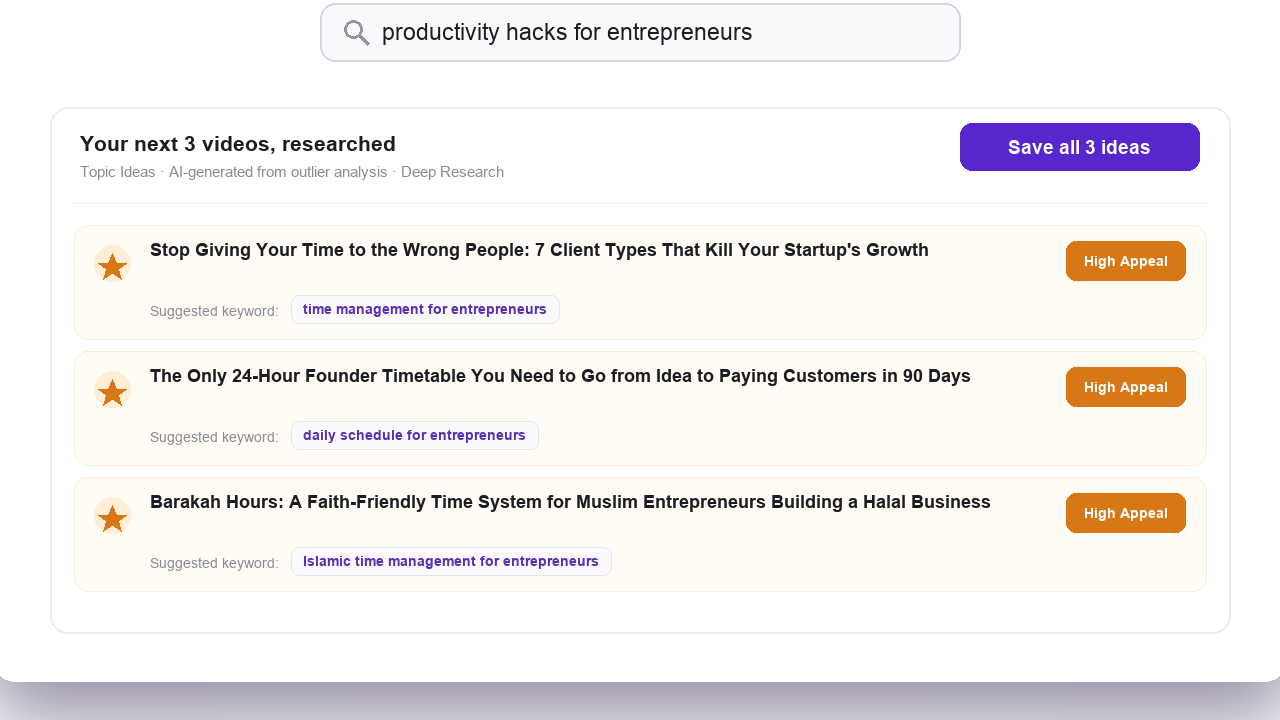
Deep Research insights
Frequently Asked Questions
Can I use Claude to analyze YouTube competitors?
Yes. Claude can analyze YouTube competitive data when you give it structured intelligence from a tool like OutlierKit. Claude cannot access YouTube on its own. But OutlierKit's Competitor Studio generates niche-wide competitive reports. These reports cover audience psychographics, outlier videos, sponsor intelligence, and monetization mapping. Claude analyzes that data to produce strategic recommendations. The simplest method is to export OutlierKit data. Then paste it into a Claude conversation with targeted prompts.
What is a Claude Skill for YouTube?
A Claude Skill is a predefined capability. Claude uses it to interact with external data. For YouTube, this usually means MCP (Model Context Protocol) servers. These servers give Claude access to YouTube data. Most YouTube MCP servers only pull transcripts. The OutlierKit MCP server is live and adds our own analytics layer: semantic search across an index of scored outlier videos and channels, similar-channel discovery, and keyword volumes, plus transcripts and comments.
Do I need the OutlierKit API to use Claude with OutlierKit?
No. Method 1 exports data and pastes it into Claude. It works with any OutlierKit plan and needs no API access. Method 2, the MCP connector, is live and needs no API key either: you add one URL in Claude and sign in with Google. Method 3, the REST API, does use a key you generate from your dashboard.
What is the difference between OutlierKit MCP and YouTube transcript MCP servers?
YouTube transcript MCP servers include mcp-youtube and youtube-mcp-server. They wrap the public YouTube API and hand back captions and basic metadata. OutlierKit serves those same primitives and adds its own layer: outlier scores our engine computes, semantic search across an index of scored videos and channels, embeddings-based similar-channel discovery, and keyword volume data. Most YouTube research runs fine on OutlierKit alone. A free transcript server is still handy for bulk caption pulls you do not want to spend credits on.
What OutlierKit plan do I need for MCP or API access?
Both are included on the Pro ($99/month) and Max ($399/month) plans. The REST API uses bearer-token auth, JSON in and JSON out. The MCP connector uses OAuth through a Google sign-in, so there is no key to manage. Each call costs 2 to 10 credits depending on the endpoint, drawn from the same balance the web app uses. outliers_refresh costs 10 credits because it queries YouTube live.
Can I use OutlierKit data with ChatGPT or other AI assistants?
Yes. The export method (Method 1) works with any AI assistant that accepts text input. That includes Claude, ChatGPT, Gemini, or any other LLM. The prompt templates in this guide are written for Claude, but you can adapt them. The MCP connector is a remote server over HTTP with OAuth, so it works in Claude, in Claude Code, and in any other client that supports remote MCP servers.
Sources and method
Plan prices, credit costs and tool names come from OutlierKit's own pricing and MCP pages. Setup steps follow Anthropic's documentation for connectors, Claude Code and tool use. Credit costs can change, so check the pricing page before you plan a large batch.
Sources
- OutlierKit pricing: plans, monthly credits and which plans include MCP and API access
- OutlierKit MCP server: connector setup, the ten tools and per-call credit costs
- OutlierKit API: REST endpoints, auth and credit costs
- Claude custom connectors (remote MCP): adding a connector in claude.ai
- Claude Code MCP docs: the claude mcp add command
- Claude tool use docs: how Method 3 passes API results to Claude
Choosing which server to connect first
Start with the OutlierKit connector for this workflow: it pairs transcript pulls with outlier scores, niche-wide semantic search, and keyword volumes, which is what the templates above rely on. The transcript-only servers mainly differ on price and limits. For the full field, see Every YouTube MCP server compared, with dedicated reviews of NexLev MCP, vidIQ MCP, and TubeLab MCP.
Wiring Claude + OutlierKit into an agency or product workflow?
Book a 30-minute demo with the founder. We'll walk through the setup live and cover API/MCP access and multi-seat pricing for agencies and teams.
Turn competitive intelligence into YouTube strategy
OutlierKit gives Claude the strategic data it needs. That includes audience psychographics, outlier detection, sponsor intelligence, and monetization mapping across thousands of channels.
Try OutlierKit FreeRelated reading
Competitor Studio Tool
Enter one channel and scan thousands of competitors with audience psychographics, sponsor data, and monetization intelligence.
YouTube Competitor Analysis Guide
The complete guide to analyzing YouTube competitors, finding outlier videos, and building data-driven strategies.
OutlierKit API
REST API is live on Pro and Max. It covers outlier search, channel similarity, transcripts, comments, and keyword research as JSON. Use it when you want a key and a schedule rather than a chat.
OutlierKit MCP Server
Live remote connector. Add one URL in Claude and get ten YouTube research tools in every chat.
OutlierKit + n8n Workflows
Scheduled competitor reports, outlier alerts, and keyword monitoring via automated n8n pipelines.
Build on the OutlierKit API
How SaaS teams wire OutlierKit underneath their own influencer, agency, and creator-intelligence products.
Influencer Platform APIs Compared
Modash, Aspire, Upfluence, GRIN, CreatorIQ. See what each ships and where OutlierKit fits underneath.