Advanced Keyword Research for YouTube Creators
Go beyond basic search volume. See opportunity scores, keyword growth trends, channel size distribution, market saturation, audience intent, and content angles. Everything you need to pick winning keywords with confidence.
- Opportunity score & growth trends
- Channel size distribution analysis
- Audience intent & psychographics
- Content angles & market saturation





Rated 5.0/5 on Product Hunt
Updated
10M+
Videos Processed
TL;DR
OutlierKit’s advanced YouTube keyword research goes far beyond basic volume and difficulty. See keyword growth trends (weekly, monthly, yearly), opportunity scores, channel size distribution, saturation analysis, video duration insights, median views, estimated audience size, content angles, and audience psychographics, all in one tool. It is built for experts, consultants and coaches who want topics their audience already searches for.
Everything You Need for YouTube Creators
Powerful features to help you grow your channel
Opportunity Score & Growth Trends
Every keyword gets an opportunity score that combines search demand, competition level, and growth trajectory into a single actionable number. See how a keyword is trending on a weekly, monthly, and yearly basis so you can spot rising topics before they saturate. Instead of guessing whether a keyword is worth targeting, the opportunity score tells you exactly where the best openings are for your channel size.
Channel Size Distribution
See who is actually ranking for any keyword, broken down by subscriber count. OutlierKit shows the percentage of small channels competing for each term and a full channel size distribution so you know if a keyword is dominated by mega-channels or wide open for smaller creators. This tells you at a glance whether you have a realistic shot at ranking, with no more guessing based on a single difficulty number.
Saturation & Market Analysis
Understand how crowded a keyword really is. OutlierKit analyzes content saturation around any keyword: how many videos exist, how frequently new ones are published, and whether supply is outpacing demand. The market analysis shows median views, estimated audience size, and average views for discovered topics, giving you a complete picture of the keyword’s economics before you commit to creating a video.
Video Duration & Performance Insights
See the typical video length that performs best for any keyword. OutlierKit analyzes the duration of top-ranking videos and shows you what length your audience expects. Combined with median views per video and performance benchmarks, you can plan your content format (short-form, mid-length, or long-form) based on what actually works for that specific keyword, not generic advice.
Content Angles & Topic Discovery
A keyword alone is not a video. OutlierKit identifies specific content angles you can take to target any keyword, surfaces related topics with their average views, and shows you which approaches are underserved. This turns a single keyword into multiple video opportunities, each with a distinct angle that appeals to different segments of the audience.
Audience Intent & Psychographics
Understand what your audience is really looking for when they search a keyword. OutlierKit identifies the underlying audience intent (tutorials, reviews, entertainment, or comparisons) and reveals psychographic insights about the viewers behind those searches: their pain points, motivations, and what drives them to click. Create content that resonates on a deeper level and still ranks.
See Advanced Keyword Research in Action
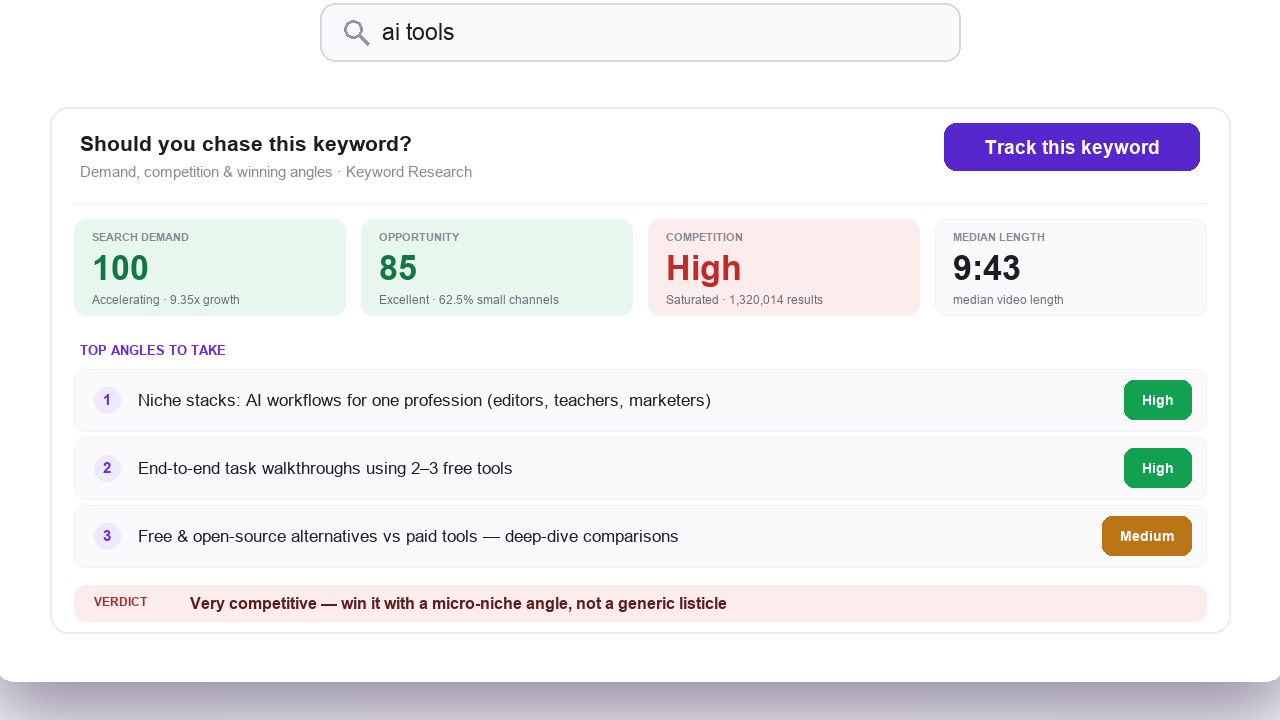
Enter any keyword and see the full market picture in one view: opportunity score, growth trends, channel size distribution, saturation, content angles, and audience psychographics.
Enter your keyword
Type any keyword or topic to get a full market analysis.
Review the full picture
See opportunity score, growth trends, channel distribution, saturation, median views, and audience size.
Pick your angle
Choose the best content angle and video format based on audience intent and psychographic data.
How OutlierKit Compares to Other YouTube Keyword Tools
Most keyword tools stop at search volume and difficulty. OutlierKit adds opportunity scores, channel size distribution, saturation analysis, content angles, and audience psychographics. Choose OutlierKit if you are an expert, consultant or coach who wants low-competition keyword research for YouTube. Choose VidIQ for affordable daily keyword tracking inside your YouTube workflow. Choose TubeBuddy for A/B testing and bulk channel management alongside keyword tools. Choose Ahrefs if you also need web-wide SEO data beyond YouTube. The table below shows how we compare across the metrics that matter for strategic content decisions.
| Feature | OutlierKitBest Value | VidIQ | TubeBuddy | Ahrefs |
|---|---|---|---|---|
| Search Volume Data | ||||
| Opportunity Score | ||||
| Growth Trends (Weekly/Monthly/Yearly) | ||||
| Channel Size Distribution | ||||
| Saturation & Market Analysis | ||||
| Video Duration Insights | ||||
| Content Angles & Topics | ||||
| Audience Intent & Psychographics | ||||
| Outlier Detection | ||||
| Best for | Experts and coaches picking low-competition keywords with opportunity scores and channel size data | Affordable daily keyword tracking inside your YouTube workflow | A/B testing and bulk channel management alongside keyword tools | Teams that also need web-wide SEO data beyond YouTube |
| Pricing | $49/mo Hobby plan | $19/mo Boost plan | $27/mo Legend, billed annually | $129/mo Lite plan |
Simple, Transparent Pricing for Every Creator
Pick the plan by how you run your channel. Hobby covers an expert or coach with one channel. Pro covers weekly publishing and adds Competitor Studio and the MCP connector. Max covers agencies with client channels. Start with a free trial of OutlierKit's keyword research: 30 credits, no credit card required, and you can cancel anytime. Every search costs a set number of credits, and annual billing saves 50%.
Hobby
For experts and coaches running one channel
- 100 credits/month
- Keyword Research: 2 credits
- Advanced Keyword Research: 10 credits
- Outlier Research: 2 credits
- Video script analysis: 10 credits per run
- Channel analysis: 10 credits
- Deep Research: 20 credits per query
- Title, description, hashtags & chapters
- Script review
Pro
For experts, consultants and brands that publish every week
- 500 credits/month
- Keyword Research: 2 credits
- Advanced Keyword Research: 10 credits
- Everything in Hobby
- Competitor Studio: 50 credits per run
- MCP server & API access
- 50 credits per connected channel
Max
For agencies running keyword research across client channels
- 2,000 credits/month
- Everything in Pro
- Connect 50+ YouTube channels
- Sponsor & comment intelligence
- Advanced competitor identification
- Update data on demand
- Priority MCP & API access
What Creators Say About OutlierKit
How creators use OutlierKit's data-driven keyword research to find low-competition keywords and grow their channels.
★★★★★5.0/5 on Product Hunt →“Great addition to my stack and simple to use. Hit an issue and the team worked hard to fix it. Great product, hardworking team.”
“Been creating for years, running multiple YouTube channels. OutlierKit is the first tool that actually improved our view counts almost instantly. The competition analysis revealed gaps we never knew existed.”
“OutlierKit has drastically reduced my time to plan content for my SaaS YouTube channel. The deep research feature revealed insights I'd overlooked earlier. A must-have if you're serious about YouTube as an acquisition channel.”
Verified Ratings Across Platforms
Frequently Asked Questions About Advanced Keyword Research
Questions about opportunity scores, growth trends, channel size distribution, and the other advanced features? These answers cover the most common questions creators ask about OutlierKit’s keyword research capabilities.
What is the opportunity score in OutlierKit's keyword research?
How do keyword growth trends work (weekly, monthly, yearly)?
What does the channel size distribution show me?
How does saturation analysis help my content strategy?
What are content angles and how do I use them?
What do audience intent and psychographics reveal?
How does video duration analysis help me plan content?
What is the difference between basic and advanced keyword research?
How do I use median views and estimated audience size?
Can small channels benefit from advanced keyword research?
How often is the keyword data updated?
More OutlierKit Features
Keyword research is just the beginning. Explore all the tools to grow your channel.
Competitor Analysis
Analyze any YouTube channel in depth. See their best videos, growth patterns, and content strategy.
Outlier Finder
Discover videos that outperformed expectations. Find content ideas proven to go viral in your niche.
Video Analyzer
Analyze any YouTube video. See why it performed well, what keywords it ranks for, and how to replicate its success.
Before you record: packaging and script tools
Once you pick the idea, OutlierKit writes the packaging and checks your script. You still film and edit the video yourself. The Title tool ranks its titles against real breakout videos near your topic. All four are on every plan and the 30-credit trial. On Pro and Max, the MCP connector also lets Claude run OutlierKit research for you.
Title
Writes 16 titles and ranks them against real breakout videos near your topic, with a score and a one-line reason for each.
Open in the app →How it worksDescription & hashtags
Writes the 150 characters people see and the rest of the description separately, then picks your hashtags.
Open in the app →How it worksChapters
Writes chapter titles that help viewers scan the video and jump to the part they came for.
Open in the app →Script review
Scores the script you wrote and shows what to fix before you record, so you reshoot and re-edit less.
Open in the app →How it works
Ready to go beyond basic keyword research?
Use OutlierKit’s advanced keyword research to find low-competition opportunities with opportunity scores, growth trends, channel size distribution, and audience insights.
Start Free. No Credit CardKeyword research for agencies and multi-channel teams
Running keyword research across client channels? The Max plan ($399/month, 2,000 credits) connects 50+ channels. Keyword research costs 2 credits per query, so one balance covers every client. Use API and MCP access to send opportunity scores and channel size data into your own dashboards and client reports. Brands can use the same size data before they enter a new category. It shows whether big channels already own the search results.
Want to learn the methodology behind effective keyword research? Read The OutlierKit Keyword Stack Method. It is a 4-layer process (Seed, Expand, Validate, Prioritize) that turns raw keyword data into a prioritized content plan.