Competitor Studio Tutorial: A Complete 10-Step Walkthrough
OutlierKit's Competitor Studio provides a complete competitive intelligence report for your YouTube niche. Enter a seed channel URL and spend 50 credits (10 to refresh). It is on Pro and Max, and on the free trial once you have 50 credits. You get eight analysis modules. They cover niche mapping, competitor discovery, performance benchmarking, audience psychographics, outlier opportunities, sponsor intelligence, monetization funnels, and comment intelligence. OutlierKit is built for experts, consultants and coaches who teach on YouTube, and for the agencies that run their channels.
This tutorial walks you through every step of using Competitor Studio. It starts with entering your first seed channel URL. It ends with pulling useful insights from each of the eight intelligence modules. You might be analyzing your niche for the first time. Or you might be running a quarterly competitive refresh. Either way, follow these 10 steps to get the most out of every analysis.
TL;DR: The 10-Step Competitor Studio Walkthrough
- Step 1: Enter a seed channel URL. Any YouTube channel works as your starting point.
- Step 2: Wait for the niche scan. Most scans analyze thousands of channels in minutes.
- Step 3: Niche Mapping & Positioning. See your place on the competitive map.
- Step 4: Competitor Discovery. Find the fastest-growing and emerging channels.
- Step 5: Performance Benchmarking. Compare metrics against the niche median.
- Step 6: Audience Psychographics. Understand viewer segments and motivations.
- Step 7: Outliers & Opportunities. Browse 1,000-5,000+ viral videos with context.
- Step 8: Sponsor Intelligence. Map which brands sponsor the niche.
- Step 9: Funnels & Monetization. Learn how channels make money beyond ads.
- Step 10: Comment Intelligence. Discover audience signals from niche-wide comments.
Key Takeaways
| Step | Feature / Area | Quick Win |
|---|---|---|
| Step 1 | Seed Channel URL | Paste any YouTube channel URL to start the analysis. |
| Step 2 | Niche Scan | Wait a few minutes while thousands of channels are scanned. |
| Step 3 | Niche Mapping & Positioning | See where your channel sits next to competitors. |
| Step 4 | Competitor Discovery | Spot fast-growing and emerging channels in your space. |
| Step 5 | Performance Benchmarking | Compare your views, subs, and engagement to the niche median. |
| Step 6 | Audience Psychographics | Learn viewer motivations and content preferences. |
| Step 7 | Outliers & Opportunities | Browse 1,000-5,000+ outlier videos for content ideas. |
| Step 8 | Sponsor Intelligence | See which brands sponsor channels in your niche. |
| Step 9 | Funnels & Monetization | Learn how top channels monetize beyond ads. |
| Step 10 | Comment Intelligence | Find audience pain points and content requests in comments. |
Competitive Intelligence
Get Competitor Studio on a Pro or Max plan
A run costs 50 credits. The free trial gives 30, and connecting the MCP connector adds 20, so a trial can cover one run. Enter one channel and analyze thousands of competitors. You get niche mapping, outlier videos, audience psychology, sponsor data, and monetization strategies. No credit card required.
The Eight Intelligence Modules at a Glance
Each Competitor Studio analysis produces a report with eight interconnected modules. Steps 3-10 below walk through each one in detail.
Niche Mapping
Competitor Discovery
Benchmarking
Psychographics
Outliers
Sponsors
Monetization
Comments
All eight modules come from a single analysis. No extra credits required.
The 10-Step Competitor Studio Walkthrough
Enter a Seed Channel URL
Open Competitor Studio from the OutlierKit dashboard. Paste any YouTube channel URL into the input field. This channel acts as your seed. It is the starting point the system uses to discover and map your entire niche. Competitor Studio works best when the seed channel is large enough to represent the niche. An established channel with a clear audience and a steady body of content is ideal. Very small or brand-new channels often lack enough topic and audience signal. Without that signal, the system cannot map the surrounding niche reliably. The seed channel does not need to be your own. You can enter any competitor, aspirational channel, or niche leader. The system uses the seed channel's content, audience signals, and topic footprint. It uses them to find related channels across the niche. Choosing the right seed matters. Pick a channel that sits squarely within the niche you want to analyze. If you pick a channel that straddles multiple niches, the results may be broader than expected. For the most focused analysis, choose a channel that posts only in your target niche.

What To Do
- Go to Competitor Studio from the OutlierKit dashboard.
- Paste a full YouTube channel URL (e.g., youtube.com/@channelname).
- Choose a channel large enough to represent the niche: established, with a clear audience and a steady topic focus.
- Click the 'Analyze' or 'Run Analysis' button to begin the scan.
Pro Tip
Want to see how you compare against your niche? Enter your own channel URL as the seed. This gives the most useful report, because every benchmark applies directly to your channel.
Wait for Niche Scan
After you submit the seed channel URL, Competitor Studio starts scanning thousands of channels in your niche. Most scans finish in minutes. The exact time depends on the size and complexity of the niche. During this time, the system finds related channels. It looks at content similarity, audience overlap, topic clustering, and competitive signals. It builds a full niche graph. The graph maps the links between hundreds or thousands of channels that share your audience. You do not need to stay on the page. The analysis runs in the background. The full report is saved to your account once it is complete. Larger niches like tech reviews or personal finance take longer. They simply have more channels to process. Smaller niches with fewer active channels finish faster.
What To Do
- Wait for the scan to complete. Most scans finish in minutes.
- You can navigate away. The analysis continues in the background.
- You will get a notification, or the report will appear in your dashboard.
- Once complete, all eight modules are ready to explore.
Pro Tip
While the scan runs, jot down the questions you want answered. Which competitors am I missing? What content topics are working? How does my engagement compare? Ready questions make the analysis more useful.
Review Niche Mapping & Positioning
The Niche Mapping module shows a visual map of how channels in your niche cluster together. You will see where your seed channel sits in the wider niche. If you used your own channel as the seed, you will see your own spot. Channels are grouped by content similarity, audience overlap, and topic focus. This map reveals sub-niches you may not have known about. These are pockets where channels serve specific audience segments. Each pocket has its own content styles, topics, or formats. Your position on this map tells you who your true competitors are. That may not match who you think they are. It shows which sub-niches are crowded. It also shows white space: areas where few channels are producing content.
What To Do
- Examine the visual niche map to see channel clusters.
- Identify which cluster your channel belongs to.
- Look for sub-niches or clusters with fewer channels. Those are opportunity zones.
- Note channels that appear between clusters. They may be bridging several sub-niches with success.
Pro Tip
Pay attention to channels that sit on the edges of clusters or between two groups. These channels often innovate by blending content styles from different sub-niches. That strategy is worth studying if you want to stand out.
Explore Competitor Discovery
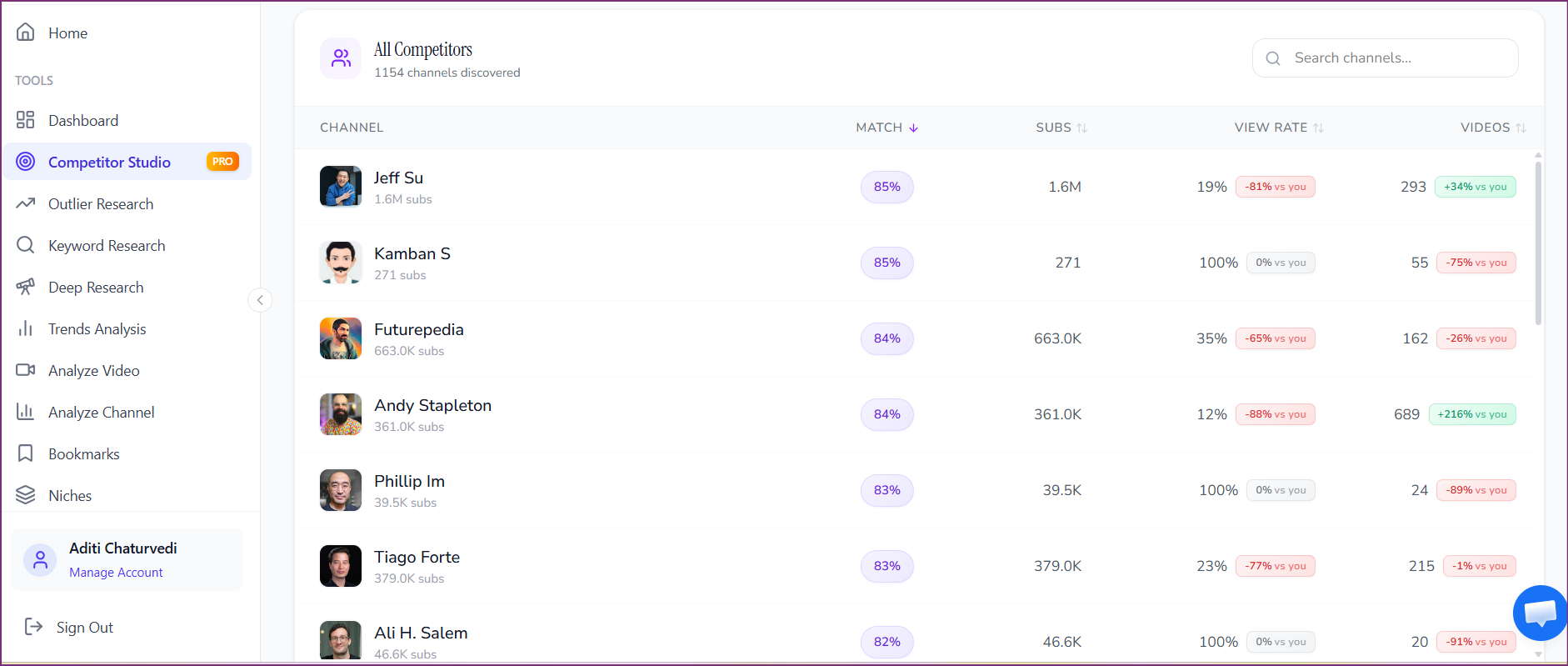
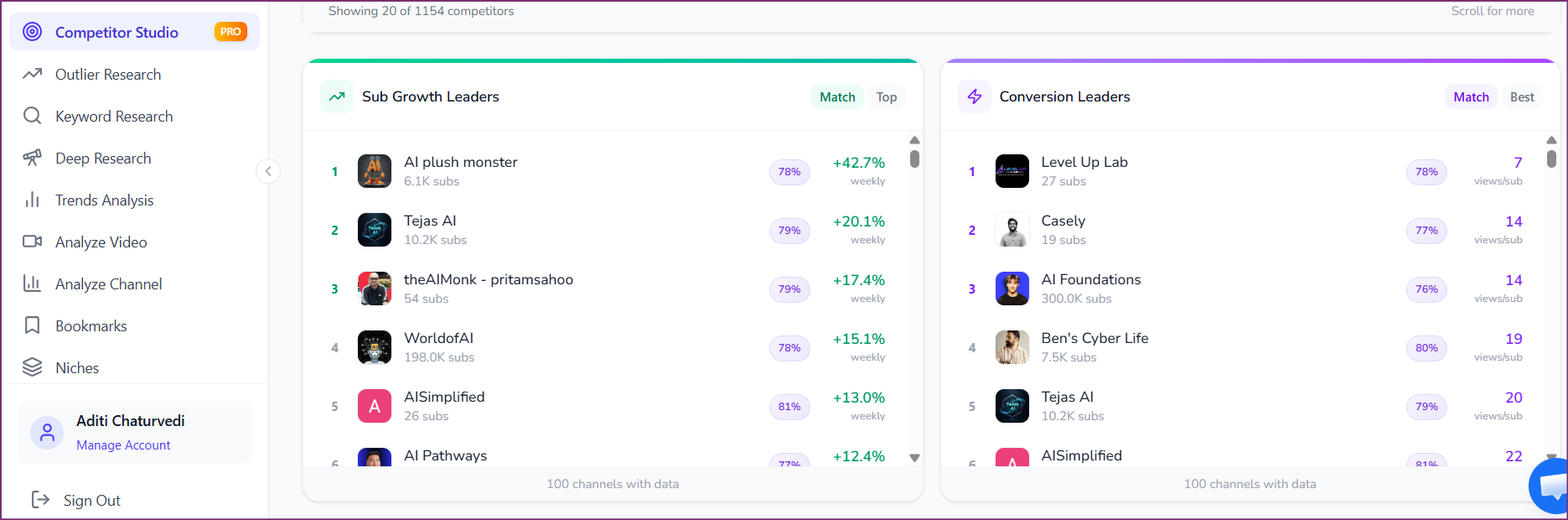
The Competitor Discovery module surfaces the channels that matter most in your niche. It organizes them along several key dimensions. You see the fastest-growing channels, ranked by subscriber velocity. You see the most active channels, ranked by upload frequency. You see the highest-performing channels, ranked by average views per video. And you see emerging channels: newer entrants gaining traction fast. This is not a static list. It is a dynamic intelligence layer that shows who is gaining momentum right now. The fastest-growing channels often point to content strategies or format experiments that resonate with the audience today. Emerging channels are extra valuable to watch. They may be pioneering approaches that larger channels have not adopted yet. You will likely find competitors you did not know about. Some serve overlapping audiences from nearby niches.
What To Do
- Review the fastest-growing channels to understand current momentum.
- Check the most active channels to see who is publishing most often.
- Study emerging channels for early signals of new content trends.
- Add key competitors to your watchlist for ongoing monitoring.
Pro Tip
Do not focus only on the biggest channels. Watch the emerging channels with high growth rates and small subscriber counts. They are often running the strategies that will define the niche in the next 6-12 months. Study them early.
Read Performance Benchmarking
Performance Benchmarking compares your channel's core metrics against the niche median and top performers. You will see how your numbers stack up against the rest of the niche. That covers average views per video, subscriber growth rate, upload frequency, and engagement rate. This module answers the basic question: am I above or below average? And by how much? The benchmarks come from real data across all the channels found in the niche scan. So they are specific to your competitive field, not generic YouTube-wide averages. Say your views per video are 40% below the niche median. Then you know there is real upside to capture. Say your engagement rate is in the top quartile. Then you know that is a strength to protect and amplify. The benchmarking data gives you a clear, data-driven picture of where you stand.
What To Do
- Compare your average views per video against the niche median.
- Check your subscriber growth rate against the niche.
- Check your engagement rate (likes, comments) against benchmarks.
- Find the metrics where you trail the niche median the most. Those are your priority areas.
Pro Tip
Focus on closing your biggest gap first. Say your views per video are 60% below median, but your engagement is above average. Fixing the views gap pays off more. Improve views while keeping engagement strong. That compounds growth faster than polishing a metric that is already strong.
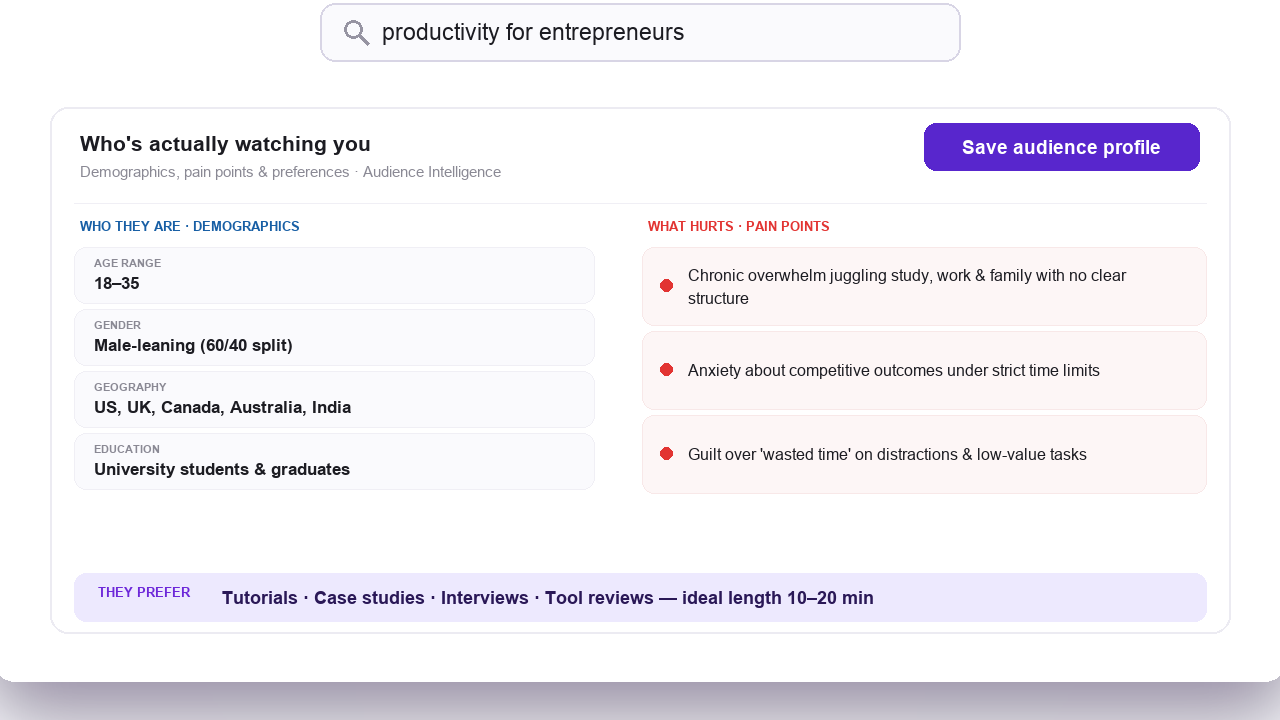
Explore Audience Psychographics
Audience Psychographics goes beyond basic demographics. It reveals the psychological profiles of viewers in your niche. Age and gender brackets only go so far. Competitor Studio shows the specific viewer segments: their motivations, pain points, and content preferences. It also surfaces the emotional triggers that make them watch, subscribe, and share. For example, a personal finance niche might surface segments like 'debt-escape seekers,' 'passive income builders,' and 'FIRE movement devotees.' Each has very different content needs and engagement patterns. This intelligence helps you tailor your content strategy to specific audience segments. The alternative is generic content that vaguely appeals to everyone but deeply resonates with no one. Rival analytics tools stop at channel-level demographics. Segment work across a whole niche is where Competitor Studio separates from them.
What To Do
- Read each identified audience segment and its profile.
- Note which segments match your existing audience best.
- Spot underserved segments that competitors are not targeting well.
- Adjust your content topics, titles, and hooks. Speak directly to your target segment's motivations.
Pro Tip
Pick one or two audience segments to focus your content on. Trying to appeal to every segment dilutes your messaging. The most successful channels in any niche dominate one or two psychographic segments first. Then they expand.
Review Outliers & Opportunities
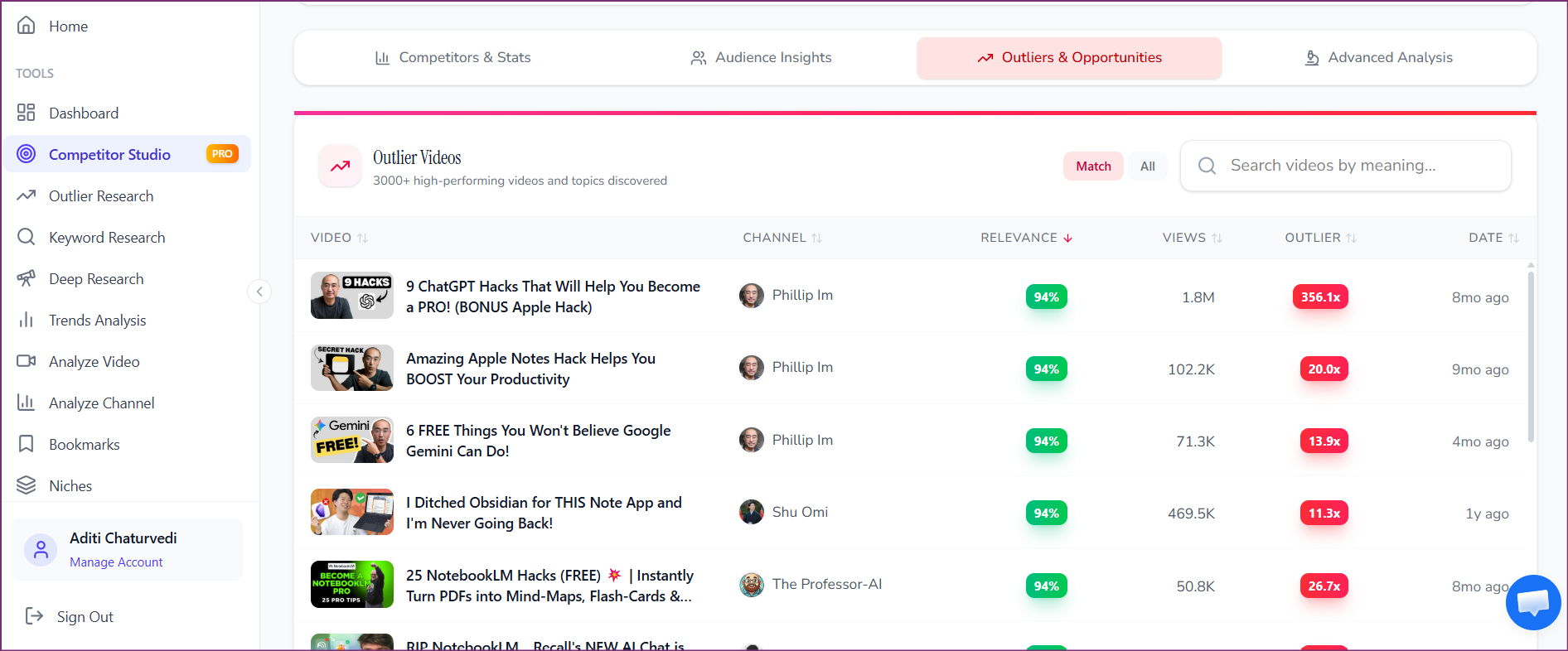
The Outliers & Opportunities module surfaces between 1,000 and 5,000+ videos across your niche. Each one far outperformed its channel's average. Most earned 3x, 5x, or 10x more views than the creator's baseline. Each outlier video includes context that explains why it outperformed. That covers the topic, the timing (trend alignment), the title and thumbnail pattern, and the audience response. You do not have to scour dozens of competitor channels by hand to find standout videos. You get a curated, analyzed collection of everything that worked. Browse by topic cluster, by outlier multiplier (3x vs. 10x), or by recency. That helps you find the patterns most relevant to your content strategy. The key is not to copy these videos. Extract the underlying principle instead: the topic angle, the format choice, the emotional hook. Then adapt it with your unique perspective.
What To Do
- Sort outlier videos by multiplier. The 10x outliers reveal the strongest demand signals.
- Filter by recency to find trends that are working right now.
- Look for topic clusters where multiple outliers appear. That signals sustained audience demand.
- Note the title and format patterns of the top outliers. Adapt them for your channel.
Pro Tip
The most useful outliers are recent (within the last 3-6 months). They also come from channels of similar size to yours. A 10x outlier on a 10K-subscriber channel is easier for you to replicate than a 10x outlier on a 5M-subscriber channel.
Explore Sponsor Intelligence
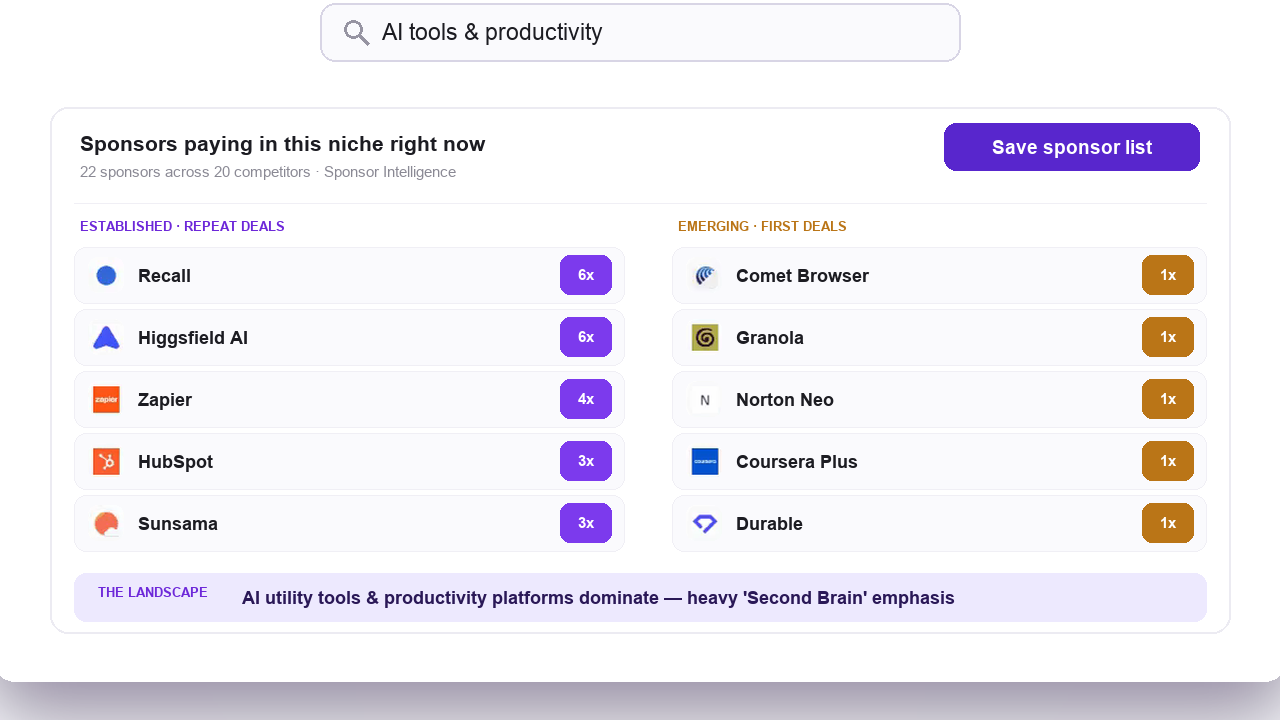
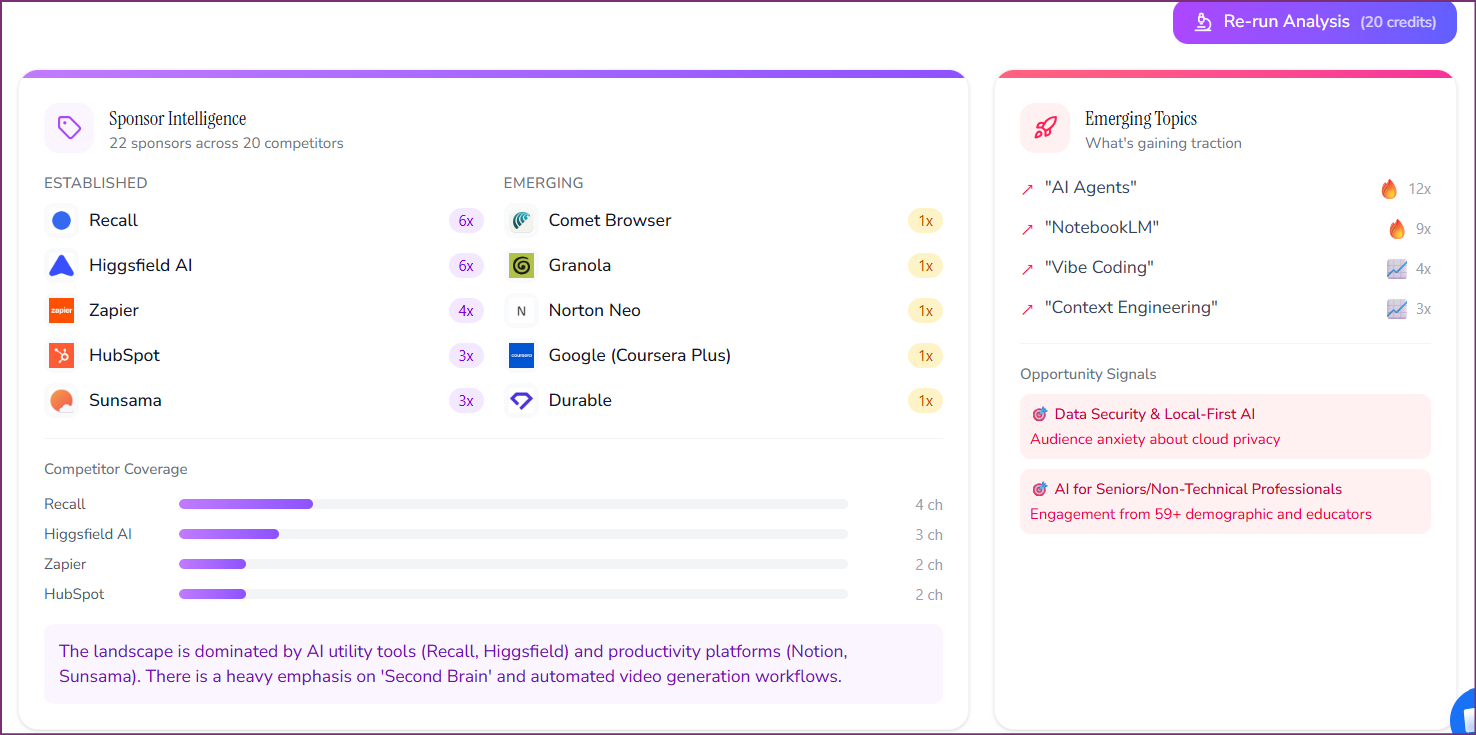
Sponsor Intelligence maps sponsorship activity across your entire niche. You will see which brands are actively sponsoring channels. You will see which sponsor categories dominate (SaaS tools, health products, financial services, etc.). And you will see how sponsorship activity spreads across channel sizes. The module identifies established sponsors. These are brands with steady, long-term sponsorship ties across multiple channels. It also flags emerging sponsors that are just entering the niche. This data matters whether you are a creator seeking sponsorship revenue or a brand deciding which channels to back. It reveals which brands are already spending money in your niche. It also shows what type of content attracts sponsor interest. You can use this intelligence to pitch sponsors with data-backed audience alignment. Or you can create content in categories that attract higher sponsorship budgets.
What To Do
- Review the top sponsor categories in your niche.
- Identify brands sponsoring channels of similar size to yours.
- Note emerging sponsors. Newer brands are often easier for smaller channels to reach.
- Look at which content types and topics attract the most sponsorship activity.
Pro Tip
Sponsors increasingly look for audience alignment over subscriber count. Does the module show brands sponsoring channels smaller than yours in the same niche? That is a signal to pitch those brands directly with your audience data.
Check Funnels & Monetization
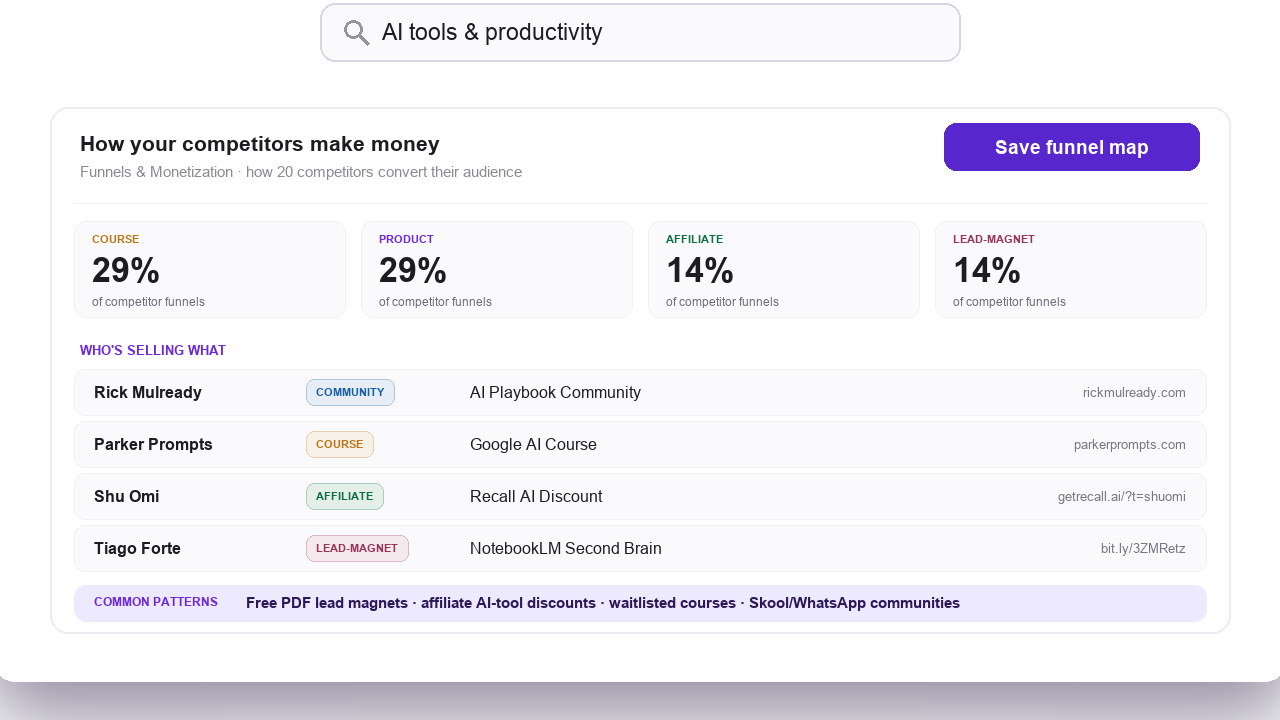
The Funnels & Monetization module reveals how channels in your niche actually make money beyond YouTube ad revenue. You will see a percentage breakdown of the monetization strategies used across the niche. The list covers lead magnets, newsletter signups, course sales, affiliate marketing, service offerings, membership programs, merchandise, and direct product sales. Each strategy includes examples of channels that use it well, plus the platforms they use. As of March 2026, we haven't found another YouTube analytics tool that maps monetization strategy at the niche level. Knowing how your competitors and peers monetize helps you spot revenue chances you may be missing. Say 40% of channels in your niche sell courses, but you rely only on ad revenue. That is a large revenue gap. Or say emerging channels build newsletter funnels while established channels lean on sponsorships. The emerging strategy may be the future of monetization in your niche.
What To Do
- Review the monetization strategy breakdown for your niche.
- Identify the top 2-3 monetization methods used by successful channels.
- Note which strategies are growing in adoption. They point to future opportunities.
- Compare your current revenue mix against the niche standard to spot gaps.
Pro Tip
Look for monetization strategies used by fast-growing channels but not yet by established ones. These emerging strategies often become the dominant revenue models within 12-18 months, as more creators adopt them.
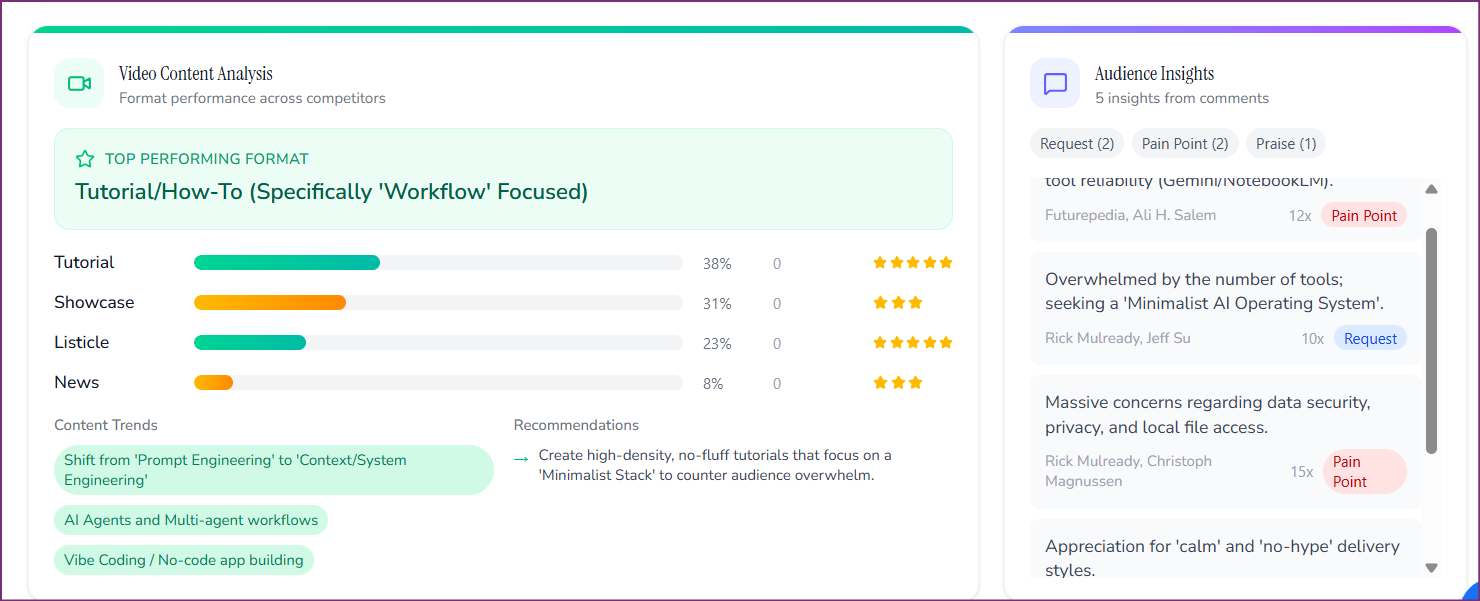
Review Comment Intelligence
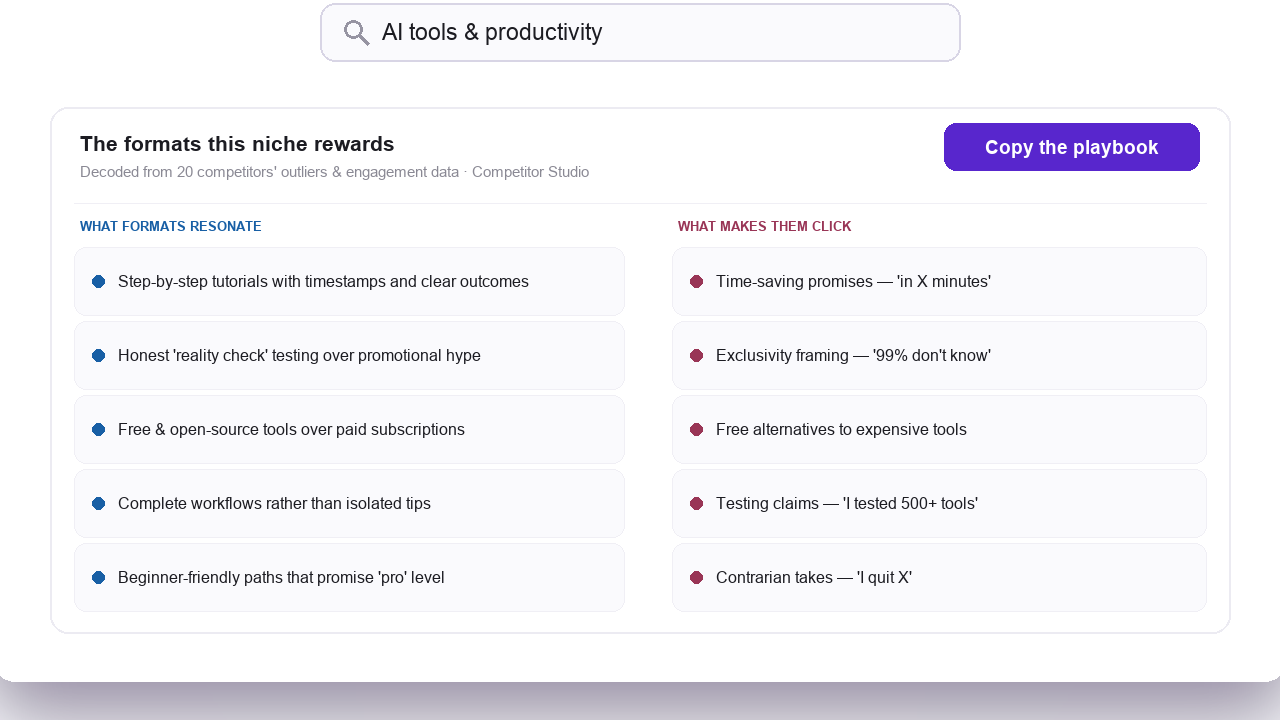
Comment Intelligence analyzes comments across your entire niche, while most comment tools only read your own channel. The module surfaces four kinds of signals. Audience requests show what viewers are explicitly asking for. Recommendations show what viewers suggest to each other. Pain points show what frustrates viewers about existing content. Praise shows what viewers love and want more of. Each signal includes the original comment and the commenter attribution. It also includes clear guidance on whether and how to act on the insight. VidIQ and TubeBuddy offer comment moderation for your own channel. Comment Intelligence analyzes comments niche-wide to reveal what your shared audience wants. These signals are often the highest-conviction content ideas you can get. They come straight from the audience voicing unmet needs.
What To Do
- Review audience requests. These are direct content ideas from your target viewers.
- Note recurring pain points. Content that solves these problems earns high engagement.
- Check recommendations. What are viewers telling each other to watch or buy?
- Use praise signals to double down on content types your audience already loves.
Pro Tip
Audience requests that appear across multiple channels are the strongest content ideas. Do viewers ask for the same thing on three different competitor channels? Then there is validated demand that you can serve.
What You Get From a Single Analysis
A single 50-credit Competitor Studio analysis produces the data below. Compiling it by hand would take weeks.
Niche Map
Visual positioning of every channel in your niche, clustered by content similarity and audience overlap.
Competitor Profiles
Detailed profiles of the fastest-growing, most active, and emerging channels in your space.
Performance Benchmarks
Your channel's views, subscribers, and engagement compared against niche medians and top performers.
Audience Segments
Psychographic profiles of viewer groups including motivations, pain points, and content preferences.
Outlier Videos
1,000-5,000+ videos that outperformed their channel averages, with analysis of why each one succeeded.
Sponsor Map
Brand categories, established sponsors, emerging sponsors, and sponsorship distribution by channel size.
Monetization Strategies
Percentage breakdown of how channels monetize: ads, courses, affiliates, products, memberships, and more.
Comment Signals
Niche-wide audience requests, recommendations, pain points, and praise extracted from comments.
When to Run a Competitor Studio Analysis
Competitor Studio is most valuable at key decision points in your YouTube strategy. These are the best times to run an analysis.
Starting a new channel
Understand the competitive field before you publish your first video. Know who you are competing against, what content works, and where the gaps are.
Quarterly strategy refresh
Run a fresh analysis every 2-3 months to catch shifts in the niche. Watch for new competitors, changing audience preferences, and emerging content trends.
Growth plateau
When your channel growth stalls, Competitor Studio shows what fast-growing channels do differently. It also shows which audience segments you may be missing.
Entering a new niche or sub-niche
Before you pivot or expand your content, map the new niche. Learn what works, who the key players are, and where opportunities exist.
Agency quarterly client refresh
If you run YouTube for clients, re-scan each client's niche every quarter. Fresh competitor lists and benchmarks keep per-client strategy reports honest.
Evaluating a category before committing brand budget
Brand teams can scan a creator niche before signing partnership deals. Sponsor Intelligence shows which channels already attract sponsor money and which categories are saturated.
Seeking sponsorship revenue
Use Sponsor Intelligence to find brands already spending money in your niche. Then create content that matches sponsor interests.
Building a monetization strategy
Funnels & Monetization shows exactly how channels in your niche make money. You can adopt proven strategies instead of guessing.
Competitor Studio vs. Channel Analyzer
Both features are part of OutlierKit, but they serve different purposes. The table below helps you decide which to use.
| Dimension | Channel Analyzer | Competitor Studio |
|---|---|---|
| Scope | Single-channel analysis | Entire niche (hundreds to thousands of channels) |
| Credit Cost | 10 credits | 50 credits (10 to refresh) |
| Best For | Analyzing a specific competitor or your own channel | Understanding the full niche |
| Audience Insights | Channel-level demographics | Niche-wide psychographic segments |
| Outlier Videos | Top videos from one channel | 1,000-5,000+ outliers across the entire niche |
| Sponsor Data | Not included | Full sponsor mapping |
| Monetization | Not included | Niche-wide monetization strategy breakdown |
Use Channel Analyzer when you need to study one specific channel. Use Competitor Studio when you need the full niche picture. Many teams use both: Competitor Studio for strategy, Channel Analyzer for single-channel analysis of specific competitors.
Frequently Asked Questions
Usage & Timing
How long does a Competitor Studio analysis take?
The initial niche scan usually finishes in minutes, though very large niches take longer. It analyzes thousands of channels. Once it is done, all eight modules open instantly. The full report is saved to your account for future reference.
How many credits does Competitor Studio cost?
Each Competitor Studio analysis costs 50 credits for the initial run. Refreshing an existing analysis costs 10 credits. On paid plans it is on Pro and Max, and it also runs on the free trial once you have 50 credits (30 trial credits plus 20 for connecting the MCP connector). The analysis runs deep: eight modules cover hundreds of data points.
What niches work best with Competitor Studio?
Competitor Studio works with any YouTube niche that has at least 20-30 active channels. It's most powerful in crowded niches like tech reviews, personal finance, fitness, cooking, and gaming. In those spaces, knowing the competitive field gives you a strategic edge.
Features & Comparisons
Can I run Competitor Studio on my own channel?
Yes. Enter your own channel URL as the seed channel. You will see exactly how you compare against your niche. This is one of the most valuable uses. You'll see your positioning, benchmark gaps, and the opportunities you're missing.
How is this different from Channel Analyzer?
Channel Analyzer examines a single channel in depth (10 credits). Competitor Studio analyzes your entire niche. That can mean hundreds or thousands of channels. It gives you the whole competitive field: audience insights and market opportunities. A single-channel analysis can't provide that.
Do I need to run it again if my niche changes?
We recommend a new analysis every 2-3 months. Run one sooner if you notice big shifts in your niche. YouTube changes fast, and fresh data keeps your strategy current.
Related Resources
Also See
Ready to grow your YouTube channel?
OutlierKit is built for experts, consultants and coaches who share what they know on YouTube. It finds the videos beating their channel average in your niche, then writes your title, description and chapters and reviews your script before you record. On Pro and Max, Claude can run the same research through the MCP connector.
Try OutlierKit Free