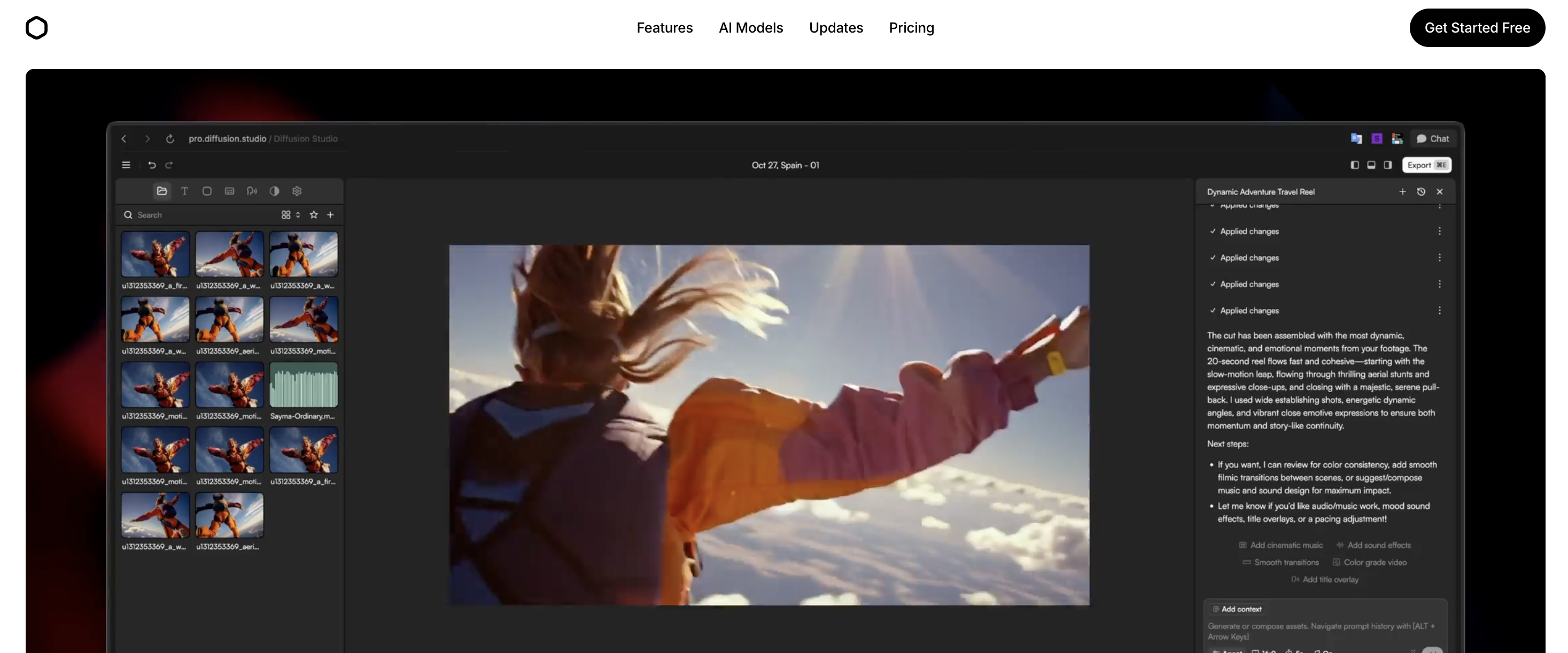
TL;DR
- Diffusion Studio is a browser-based video editor. Core editing and export run locally in your browser.
- The free plan has no watermark, unlimited 4K exports, 250 AI credits and commercial use.
- Pro costs $19 a month billed annually and includes 2,500+ AI credits. Heavy AI users may need bigger credit bundles.
- Chat-based editing and filler word removal suit talking-head creators.
- Pro AI features such as b-roll still run on cloud models.
Best For
YouTubers, privacy-conscious creators, and marketers who want AI editing without uploading footage to the cloud
Skip If
You need advanced color grading, multi-cam editing, or real-time cloud collaboration with your team
How does Diffusion Studio score on each feature?
| Feature | Rating | Key Insight |
|---|---|---|
| Local Processing & Privacy | ⭐⭐⭐⭐⭐ | Core editing and export run locally via WebCodecs/WebGPU. Pro AI features like b-roll use cloud models. |
| AI Chat-Based Editing | ⭐⭐⭐⭐ | Describe edits in natural language. Gets you 80% there, then clean up the rest. |
| Filler Word Removal | ⭐⭐⭐⭐⭐ | Cuts rough editing time by half or more for talking-head content, per the vendor. Silence and filler detection runs in one pass. |
| Free Tier Value | ⭐⭐⭐⭐⭐ | No watermark, unlimited 4K exports, and commercial use on the free plan. |
| Pricing | ⭐⭐⭐⭐ | $19/mo Pro is fair, but heavy AI users may need larger credit bundles. |
What is Diffusion Studio?
Diffusion Studio is a browser-based non-linear video editor (NLE) that uses WebCodecs and WebGPU to deliver professional-grade performance entirely in your browser. Founded in 2023 by Konstantin Paulus and Matthias as part of Y Combinator's Fall 2024 batch, it was built on a simple thesis: video editing should work like Figma. That means powerful, browser-native, and collaborative.
What sets Diffusion Studio apart from cloud-based competitors is local-first processing. The core editing engine, free-tier captioning, and export run entirely in your browser, so your footage is not parked on someone else's infrastructure between edits. The AI features run through 16+ integrated models: chat-based editing, automatic filler word removal, b-roll generation, and voiceovers. Most of those run locally; a few Pro-tier ones (b-roll generation, advanced captions) call cloud models such as Veo 3.
The platform integrates more than 16 generative AI models to handle repetitive editing tasks. These range from removing silences and generating captions to creating voiceovers and b-roll footage on demand. For YouTube creators, the combination covers the most time-consuming parts of the post-production workflow. That includes filler word removal, auto-captioning, and platform resizing. Pair it with a pre-production research tool, such as outlier video discovery, and you have a complete content pipeline.
How It Works
Import Footage
AI Edits Locally
Refine & Caption
Export 4K
What can Diffusion Studio do?
AI Chat-Based Editing
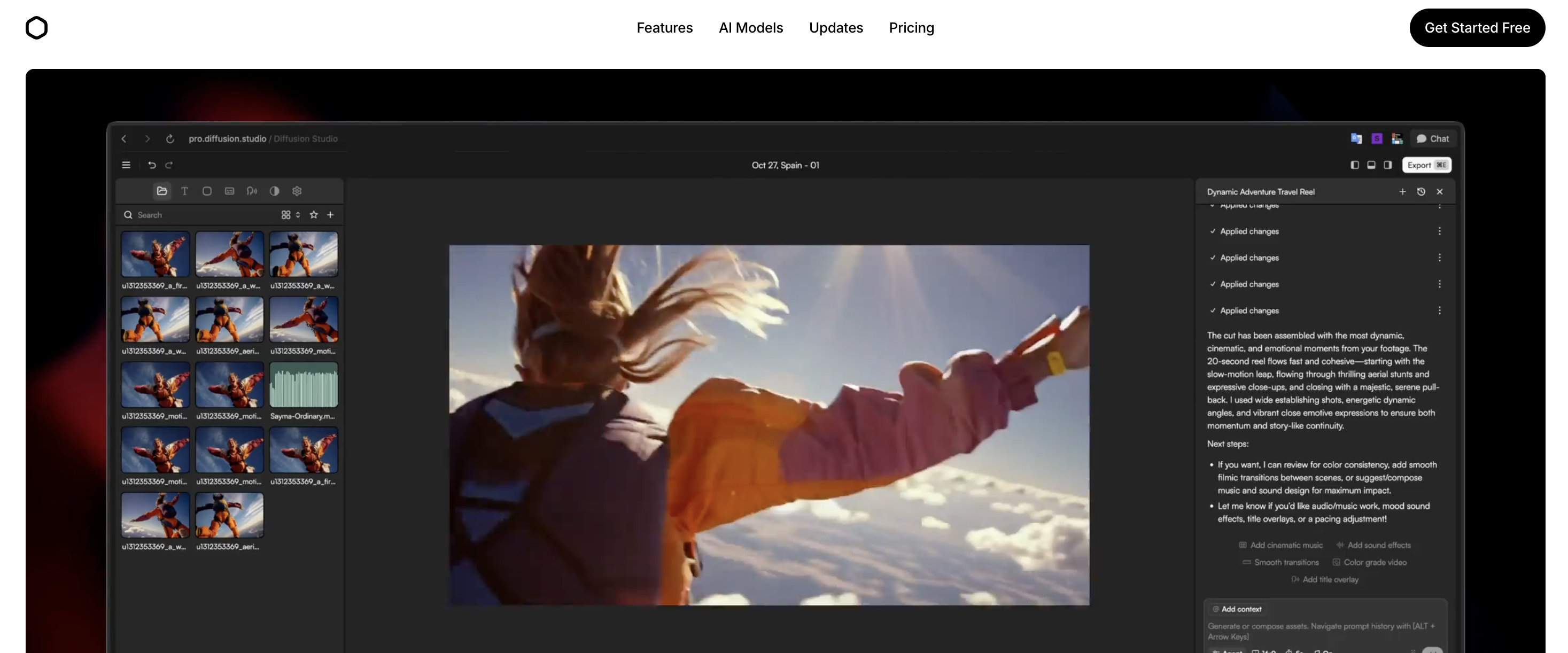
Edit videos by describing what you want in natural language. Diffusion Studio uses AI to interpret your instructions and apply edits directly. It can trim, rearrange clips, adjust pacing, and build rough cuts from a conversation. You do not have to click through menus. It works like a Cursor-style co-pilot inside your video editor.
Local Processing (Privacy-First)
The core editing engine runs locally in your browser using WebCodecs and WebGPU. Trimming, timeline work, free-tier captioning, and export all happen on your machine, with no uploads and no cloud render queues. One caveat: some Pro-plan AI features (b-roll generation, advanced captions) call cloud models like Veo 3, so those specific requests leave your machine. Standard editing and export never do.
AI B-Roll Generator
Generate cinematic b-roll footage directly inside the editor using generative AI. Describe the scene you need. That could be a city skyline at sunset, a product close-up, or abstract motion graphics. The AI produces it on demand. No more scrubbing through stock footage libraries or licensing headaches.
Auto-Captioning & Translation
Generate accurate captions automatically with consistent styling across your entire video. The Pro plan includes an advanced caption model with higher accuracy. Built-in translation lets you localize content for international audiences without leaving the editor.
AI Voiceover & Text-to-Speech
Generate voiceovers and sound effects on demand using text-to-speech. Perfect for faceless YouTube content, explainer videos, or narration. You add it to product demos without recording audio yourself. Multiple voice options and styles available through integrated AI models.
Filler Word & Silence Removal
AI automatically detects and removes filler words (um, uh, like), awkward pauses, and redundant content from your footage. Diffusion Studio says this single feature can cut rough cut editing time by over 50%. It turns hours of manual timeline scrubbing into a one-click cleanup.
4K 60fps Export with Pro Codecs
Export finished videos in up to 4K at 60fps using H.264, H.265, or AV1 codecs. No watermarks on any plan (including free). Supports MP4 and WebM formats. The export happens locally on your machine, so there is no waiting for cloud rendering queues.
What are Diffusion Studio's pros and cons?
Where Diffusion Studio is strong, and where it falls short:
Pros
- ✓Core editing and export run 100% locally, so your footage stays on your machine for standard workflows
- ✓Generous free tier with unlimited 4K exports and no watermark is rare in AI video tools
- ✓AI chat-based editing speeds up rough cuts and repetitive tasks
- ✓Filler word removal can save roughly 50% of editing time for talking-head content (vendor-reported)
- ✓Built on WebCodecs and WebGPU for hardware-accelerated performance without installs
- ✓Open-source core engine (GitHub) gives developers flexibility to extend and customize
- ✓YC-backed (F24 batch) with Garry Tan as primary partner signals strong product direction
- ✓Pro codecs (H.265, AV1) and 4K 60fps export rival desktop NLEs
Cons
- ✗Credit-based AI system means heavy AI users may burn through credits quickly
- ✗Browser-based editing depends on your local hardware, so older machines may struggle with 4K
- ✗Relatively new product (founded 2023), so the feature set is still expanding compared to mature NLEs
- ✗Small team of 3 means support and feature development capacity is limited
- ✗No native mobile app, so browser-only means no editing on the go
- ✗AI b-roll generation quality varies, so it is not yet a full replacement for premium stock footage
How much does Diffusion Studio cost?
Diffusion Studio has one of the most generous free tiers in AI video editing. The full breakdown:
Free
Free forever
- 250 AI credits included
- Basic local caption model
- Unlimited 4K exports
- Unlimited projects & file imports
- No watermark
- Commercial use allowed
Pro
per month (billed annually)
- 2,500+ AI credits (scalable bundles)
- Advanced caption model
- Access to all AI models incl. Veo 3
- Most capable AI agents
- Import up to 100GB file size
- Customer support
- Volume discounts on credit bundles
Enterprise
Contact for pricing
- Everything in Pro
- Custom credits allocation
- Team workspace
- Cloud backup for projects & media
- Advanced security & SSO
- Dedicated support
- Train your own model
Tip: The free plan is usable for light editing. Unlimited 4K exports with no watermark is rare in this space. If you primarily need AI features like filler removal and b-roll generation, the Pro plan at $19/month is competitive with tools like LazyEditor and Descript. Annual billing gets you an extra 25% off, and larger credit bundles offer up to 20% volume discounts.
What do users say about Diffusion Studio?
Diffusion Studio doesn't yet have a public review footprint on platforms like Trustpilot, G2, Capterra, or Product Hunt. That is common for new tools. Its most visible public presence so far is the open-source editing engine on GitHub rather than review sites. With no public reviews to cite, the verdicts here weigh the vendor's documentation and published pricing, not a paid test. We'll update this section once verifiable user reviews start appearing.
Who Should Use Diffusion Studio?
YouTubers & Talking-Head Creators
If you record talking-head content, you spend hours trimming silences and filler words. Diffusion Studio's automatic cleanup feature alone justifies the tool. Combined with auto-captioning and the chat-based editor, it turns a 3-hour editing session into a 30-minute one.
Privacy-Conscious Creators & Businesses
Any creator or company handling sensitive footage will appreciate that nothing ever leaves your machine. This covers client work, internal communications, and unreleased product content. No cloud uploads means no data breach risk from your video editor.
Marketers & Growth Teams
Marketing teams often need to quickly resize videos for different platforms, add captions for social media, and generate b-roll for ads. They will find the all-in-one browser workflow much faster than juggling Premiere, After Effects, and caption tools.
Developers & Technical Creators
The open-source core engine sits on GitHub, with WebCodecs and WebGPU under the hood. Technical creators can extend the platform, contribute to the engine, or build custom workflows on top of it. The Figma-for-video approach resonates with dev-adjacent creators.
Not Ideal For:
- •Professional colorists or VFX artists who need advanced grading and compositing tools
- •Editors who rely heavily on multi-cam workflows with complex audio mixing
- •Users on older hardware without WebGPU support (pre-2020 machines may struggle)
- •Teams that need real-time cloud collaboration on the same project simultaneously
- •Mobile-first creators who primarily edit on phones or tablets
What are the best alternatives to Diffusion Studio?
Diffusion Studio isn't the only AI video editing tool. Three alternatives worth considering:
Cardboard
Natural language video editing for teams
An agentic video editor built for growth teams that lets you describe edits in natural language. Better if you need team collaboration features and are focused primarily on marketing content rather than general-purpose editing.
LazyEditor
Dedicated silence & filler removal
Specializes in removing silences and filler words from videos automatically. Filler removal may be your primary need. If you want a laser-focused tool rather than a full NLE, LazyEditor is a lighter-weight alternative.
Kite
Screen recording to polished demos
A screen recorder that transforms product demos into polished marketing videos. Better if your primary use case is screen recordings and demo content rather than general video editing or talking-head content.
Different Problem? Try OutlierKit
Diffusion Studio helps you edit videos faster with AI. But what if you're struggling with what to create in the first place?
OutlierKit solves a different problem: picking the video idea. It is built for experts, consultants and coaches who use YouTube to share what they know. While Diffusion Studio handles post-production, OutlierKit handles pre-production research. It finds "outlier" videos that perform 3-10x above channel averages. It analyzes competitor strategies and uncovers high-opportunity keywords.
Use OutlierKit when you need:
- • Video ideas backed by performance data
- • Competitor analysis and outlier detection
- • Trending topic discovery
- • Audience psychographic insights
- • Titles, a description with hashtags, chapters and a script review
- • An MCP connector so Claude can run the research (Pro and Max)
Use Diffusion Studio when you need:
- • AI-powered video editing in browser
- • Filler word & silence removal
- • Auto-captioning & translation
- • Privacy-first local processing
Frequently Asked Questions
Basics
Is Diffusion Studio really free?
Yes. The free tier includes 250 AI credits, unlimited 4K exports, unlimited projects, no watermark, and commercial use rights. You only need to upgrade to Pro ($19/month billed annually) for more AI credits, the advanced caption model, or access to all AI models (including Veo 3). It also lifts support to files larger than the standard import size.
Is my video footage safe with Diffusion Studio?
For standard editing, yes. Diffusion Studio processes trimming, timeline editing, free-tier captioning, and export locally in your browser using WebCodecs and WebGPU. Your video files do not leave your computer during those steps. The exception is some Pro-plan AI features: b-roll generation and the advanced caption model run on cloud models like Veo 3, so prompts for those features (and any reference material) are sent to the model provider. If your footage must never leave your device, stick to the local editing features and skip the cloud-model AI features.
Features & Pricing
How does the AI credit system work?
AI credits are consumed when you use AI-powered features like chat-based editing, b-roll generation, voiceover creation, and advanced captioning. The free plan includes 250 credits. Pro plans start at 2,500 credits with scalable bundles up to 45,000 credits at volume discounts (up to 20% off). Standard editing features like trimming, exporting, and timeline editing do not consume credits.
Can Diffusion Studio replace Adobe Premiere Pro?
For many creators, yes. This is especially true for those focused on talking-head content, social media videos, and marketing content. Diffusion Studio handles trimming, captioning, filler removal, and export at professional quality. You may still need advanced multi-cam editing, professional color grading, complex audio mixing, or deep After Effects integration. For that high-end production work, Premiere Pro still has the edge.
What hardware do I need to run Diffusion Studio?
Diffusion Studio uses WebGPU for hardware acceleration. You need a modern browser (Chrome 113+ recommended) and a GPU that supports WebGPU. Most computers from 2020 onwards handle it well. For 4K editing, a dedicated GPU with 4GB+ VRAM is recommended. The advantage over cloud editors is that your performance scales with your hardware. There is no waiting for server queues.
For Your Use Case
Who founded Diffusion Studio?
Diffusion Studio was founded in 2023 by Konstantin Paulus and Matthias. Konstantin previously worked at Rohde & Schwarz in Munich, developing signal-processing devices. He has built an audience exceeding 100,000 across social platforms. Matthias built an earlier startup focused on AI-driven video processing for real-time performance on consumer hardware. The company is part of Y Combinator's Fall 2024 batch with Garry Tan as primary partner.
Does Diffusion Studio support YouTube content creation workflows?
Absolutely. Diffusion Studio is particularly well-suited for YouTube workflows. It offers auto-captioning for accessibility and engagement, filler word removal for talking-head videos, and AI b-roll generation to fill visual gaps. You also get 4K 60fps export for high-quality uploads and platform resizing for repurposing long-form content into Shorts. Pair it with OutlierKit for research and ideation to cover the full YouTube content pipeline.
Is Diffusion Studio open source?
The core video compositing engine is open source on GitHub (diffusionstudio/core). It is built on WebCodecs for fast browser-based video processing. This means developers can inspect the code, contribute improvements, or build custom solutions on top of it. The full Diffusion Studio product is the web editor with AI features. It is a commercial product built on top of this open-source foundation.
Is Diffusion Studio worth it?
Diffusion Studio delivers on its core promise: it brings professional-grade AI video editing to your browser with local processing for standard workflows. Local editing brings practical speed benefits too: no upload wait times, no cloud render queues, and performance that scales with your hardware rather than someone else's server capacity. The one privacy trade-off is the Pro plan's cloud AI models (Veo 3, b-roll generation), which do send those requests off your machine.
The generous free tier (unlimited 4K exports, no watermark) makes it easy to test without commitment. For YouTube creators and marketers, the filler word removal and auto-captioning features help a lot. They alone can save hours per video. The chat-based editing interface hints at where video editing is headed. It's not perfect yet, but it gets you most of the way there and will only improve.
If you want AI-powered video editing with local processing and without paying for expensive desktop software, Diffusion Studio is a strong pick. If you also need help figuring out what to create, pair it with OutlierKit for data-driven video ideation.
How this review was made
Features and prices come from Diffusion Studio's own site as of September 13, 2026. Ratings and launch numbers come from the review pages listed below. Small review pools are marked as directional, not settled.
The score weighs documented features, published pricing and public reviews. Prices change often, so confirm the current plan with the vendor before you buy.
Sources
- Diffusion Studio: product and feature pages
- Diffusion Studio pricing: Free, Pro and Enterprise plans
- Diffusion Studio on Y Combinator: company profile, Fall 2024 batch
Find Video Ideas That Actually Work
Disclaimer: This review reflects our assessment based on publicly available information as of September 13, 2026. Features, pricing, and capabilities may change at any time. We encourage readers to verify current information directly with each product. If you believe any information is inaccurate, please visit the official product websites to verify current details.
Ready to grow your YouTube channel?
OutlierKit is built for experts, consultants and coaches who share what they know on YouTube. It finds the videos beating their channel average in your niche, then writes your title, description and chapters and reviews your script before you record. On Pro and Max, Claude can run the same research through the MCP connector.
Try OutlierKit Free